How to Connect Car Amplifier to Electricity: Easy Step-by-Step Guide
Are you ready to boost your car’s sound system but unsure how to connect your amplifier to electricity safely and correctly? Getting this right is key to unlocking powerful, clear audio without risking damage to your equipment or your vehicle.
In this guide, you’ll discover simple, step-by-step instructions that anyone can follow—even if you’re not a tech expert. Stick with me, and you’ll have your car amplifier wired perfectly in no time, turning every drive into an amazing audio experience.
Let’s dive in!

Credit: www.youtube.com
Required Tools And Materials
Connecting a car amplifier to electricity requires specific tools and materials. Having the right equipment ensures a smooth installation. It prevents damage to your amplifier and vehicle. Prepare everything before starting the work. This saves time and avoids errors.
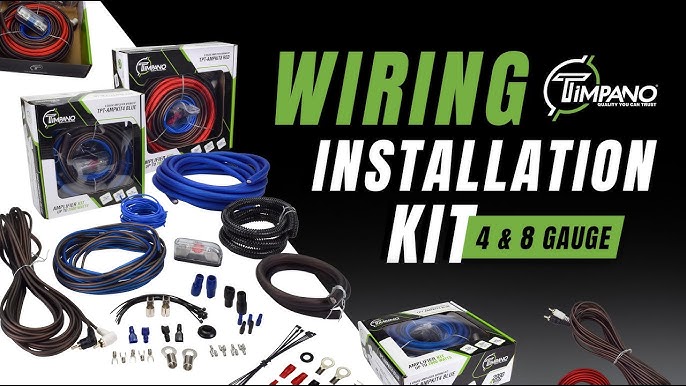
Essential Wiring Components
- Power wire with appropriate gauge
- Ground wire
- Fuse holder and fuse
- Remote turn-on wire
- RCA cables for audio signals
- Ring terminals and connectors
- Wire strippers and crimping tool
- Electrical tape or heat shrink tubing
Safety Equipment
- Insulated gloves to prevent electric shock
- Safety glasses to protect eyes
- Multimeter for voltage and continuity tests
- Flashlight for better visibility in tight spaces
- Circuit tester for checking power sources
Preparing The Car Battery
Preparing the car battery is essential before connecting a car amplifier to electricity. This step ensures safety and proper power flow to the amplifier. A well-prepared battery reduces the risk of electrical shorts or damage to your car’s electrical system.
Take time to check the battery’s condition and connections. Clean terminals help maintain a strong electrical connection. Always work carefully around the battery to avoid sparks or shocks.
Locating The Battery
Open the car’s hood to find the battery. Most cars have the battery near the front of the engine bay. It is a rectangular box with two cables attached: one positive and one negative.
Look for a cover or clamp holding the battery in place. Remove any obstacles to access the terminals easily. Identifying the battery location helps during the installation process.
Disconnecting The Negative Terminal
Always disconnect the negative terminal first. This step prevents accidental electrical shorts during installation. Use a wrench to loosen the nut on the negative terminal clamp.
Carefully lift the negative cable off the battery post. Keep the cable away from the battery to avoid contact. This action ensures safety while working on the electrical system.
Routing The Power Cable
Routing the power cable is a crucial step in connecting your car amplifier to electricity. The way you run the cable affects not only the amplifier’s performance but also your vehicle’s safety. Taking time to plan the cable path and protect it properly can save you from frustrating electrical issues later.
Choosing The Cable Path
Pick a route that keeps the power cable away from sharp edges, moving parts, and heat sources like the exhaust system. These can damage the cable insulation and cause shorts or failures.
Think about the cable length—you want it long enough to reach the battery without stretching but not so long that it creates unnecessary resistance. Use the car’s existing wire channels or run the cable under the carpet for a clean, hidden look.
Have you checked for factory grommets or openings? These spots are perfect for passing the cable through the firewall without cutting new holes. Protect the cable with split loom tubing to prevent abrasion along the entire path.
Installing The Fuse Holder
Place the fuse holder as close to the battery as possible, ideally within 18 inches. This setup protects your vehicle from potential short circuits right at the power source.
Use a fuse rated slightly above your amplifier’s maximum current draw. Installing the fuse inline is straightforward—just cut the power cable, insert the fuse holder, and secure the connections tightly.
Double-check that the fuse holder is mounted securely and away from any vibration or moisture. A loose or exposed fuse holder can cause intermittent power loss or even fire hazards, so don’t skip this safety measure.
Connecting To The Amplifier
Connecting your car amplifier to electricity is a crucial step that demands precision and care. Ensuring a solid electrical connection not only powers your amplifier effectively but also protects your vehicle’s electrical system. Let’s focus on how to attach the power wire and properly ground the amplifier to get the best performance without risking damage.
Attaching The Power Wire
The power wire is the main channel that supplies electricity from your car battery to the amplifier. Choose a wire gauge that matches your amplifier’s power requirements to avoid voltage drops or overheating.
Secure the power wire with a fuse holder placed as close to the battery as possible. This fuse acts as a safety barrier, preventing electrical fires if there’s a short circuit.
When connecting, strip the wire ends cleanly and use quality connectors or terminals. Loose connections can cause power loss or even damage your amp. Always double-check your connections by gently tugging on the wires—if they move, tighten them further.
Grounding The Amplifier
Grounding completes the electrical circuit and stabilizes the flow of electricity. Without a proper ground, you might hear unwanted noise or experience intermittent power issues.
Locate a clean, unpainted metal surface near the amplifier for the grounding point. Scrape away any paint or rust to ensure a solid metal-to-metal contact.
Use a ground wire equal in gauge to your power wire to avoid electrical resistance. Attach the wire securely using a bolt and nut, and test the connection with a multimeter to confirm it’s grounded correctly.
Have you checked your vehicle’s chassis for the best grounding spot? Sometimes the factory grounding points aren’t ideal for high-powered amplifiers, so finding a fresh point can make a big difference.
Wiring The Remote Turn-on Lead
Wiring the remote turn-on lead is a crucial step to ensure your car amplifier powers on and off with your head unit. This small wire acts like a switch, telling the amplifier when to start working. Without it, you might risk draining your car battery or damaging your audio system.
Identifying The Remote Wire
The remote wire is usually a thin blue wire coming from your amplifier wiring kit or head unit. It’s often labeled as “REM,” “Remote,” or “Remote Turn-On.” If you don’t see a blue wire, check your head unit’s manual or wiring diagram for the exact color and location.
Use a multimeter or a test light to confirm the wire carries 12 volts only when the head unit is powered on. This ensures you won’t accidentally connect to a constant power source, which could cause problems.
Connecting To The Head Unit
Once you’ve found the remote wire, connect it securely to the corresponding remote turn-on lead on your amplifier. You can use a crimp connector or solder the connection for a more reliable bond.
Make sure the connection is insulated properly with electrical tape or heat shrink tubing to avoid shorts. Have you checked if the connection feels solid and won’t come loose with vibration? That’s key for long-lasting performance.

Credit: www.amazon.ca
Final Checks And Testing
Before powering up your car amplifier, final checks and testing are essential to ensure everything works smoothly and safely. Skipping these steps can lead to poor sound quality or even damage to your equipment. Taking a few moments to inspect your work and test the system pays off in a clear, powerful audio experience.
Inspecting Connections
Carefully examine every wire and connection point. Make sure the power cable is securely attached to both the battery and the amplifier’s power terminal. Check that the ground wire is properly connected to a clean, unpainted metal surface on your car’s chassis.
Look for any loose or exposed wires that could cause shorts or interference. Confirm that the RCA cables and speaker wires are plugged in firmly and routed away from power cables to avoid noise. Have you noticed any signs of wear or corrosion on connectors? Replace these to avoid future issues.
Powering On And Testing Sound
Once connections are solid, turn on your car’s ignition and power up the amplifier. Listen carefully for any unusual noises such as buzzing or static. Start with a low volume to protect your speakers and gradually increase it to check the amplifier’s output.
Play different music tracks to test bass, mids, and highs. Does the sound stay clear without distortion? If you hear any crackling or dropouts, revisit your wiring and grounding points. Testing now saves you from frustration and costly repairs later.
Troubleshooting Common Issues
Troubleshooting common issues can save time and frustration when connecting a car amplifier to electricity. Some problems arise from simple mistakes or loose connections. Others may need careful inspection of the wiring or components.
Understanding these issues helps keep your sound system working well. Fixing problems quickly prevents damage to your amplifier or car electrical system. Below are two frequent issues and how to address them effectively.
No Power To Amplifier
Check the fuse first. A blown fuse often causes no power. Replace it with one that matches the amplifier’s rating.
Inspect the power cable. Make sure it is firmly connected to the battery and amplifier. Look for cuts or wear on the wire.
Test the ground connection. A bad ground can stop power flow. Clean the grounding point and tighten the connection.
Verify the remote turn-on wire. This wire signals the amplifier to turn on. Ensure it is connected to the head unit’s remote output.
Noise Or Distortion
Loose or poor wiring often causes noise. Check all connections and tighten them securely.
Keep power and signal cables apart. Running these close can create interference and distortion.
Check speaker wires for damage. Frayed wires or shorts cause poor sound quality.
Adjust the amplifier gain. Too high gain can distort sound. Lower it until the noise clears.

Credit: www.youtube.com
Frequently Asked Questions
How Do I Connect A Car Amplifier To The Battery?
To connect a car amplifier to the battery, use a power wire with an inline fuse. Connect the wire to the positive terminal, ensuring a secure and clean connection. This provides stable power while protecting your system from electrical surges.
What Gauge Wire Is Best For Car Amplifier Power?
Use 4 or 8 gauge wire for car amplifier power connections. Thicker wires reduce voltage drop and improve sound quality. Choose wire thickness based on your amplifier’s power requirements to ensure safe and efficient operation.
Where Should The Amplifier Ground Wire Be Connected?
Connect the amplifier ground wire to a clean, bare metal spot on your car’s chassis. This minimizes electrical noise and ensures proper grounding. Avoid painted or rusty areas to maintain a solid, low-resistance connection.
Why Is An Inline Fuse Necessary For A Car Amplifier?
An inline fuse protects your amplifier and wiring from electrical damage. It prevents shorts and overloads that could cause fires or equipment failure. Always install the fuse close to the battery for maximum safety.
Conclusion
Connecting a car amplifier to electricity is straightforward. Follow the steps carefully. Ensure you have the right tools and materials. Safety should always be your priority. Proper grounding is key for safety. Secure all connections tightly. Avoid loose wires to prevent issues.
Regularly check your setup for any faults. Enjoy better sound quality in your car. Experiment with different settings for the best experience. Troubleshoot as needed for optimal performance. Happy listening, and drive safely!