
Are you ready to enjoy crystal-clear sound and all your favorite tunes on the road? Connecting your Pioneer car stereo might seem tricky at first, but with the right steps, you can have it up and running in no time.
Imagine driving with powerful music that makes every trip better. This guide will walk you through exactly how to connect your Pioneer car stereo quickly and safely. Keep reading, and you’ll be rocking out in your car before you know it!
Preparing For Installation
Preparing for the installation of your Pioneer car stereo sets the foundation for a smooth and safe upgrade. Taking the time to get everything ready can save you from unnecessary headaches and ensure your new stereo works perfectly. Here’s how to get started with confidence.
Gathering Necessary Tools
Before you begin, collect all the tools you’ll need. This usually includes:
- Screwdrivers (both flathead and Phillips)
- Wire strippers and crimpers
- Electrical tape or heat shrink tubing
- Panel removal tools to avoid damaging your car’s interior
- Multimeter to check electrical connections
Having these tools at hand prevents interruptions during the installation. You don’t want to be halfway through and realize you’re missing a simple screwdriver. Ever been stuck without the right tool? That delay can be frustrating but totally avoidable.
Choosing The Right Pioneer Stereo Model
Picking the right stereo means understanding your car’s compatibility and your audio needs. Pioneer offers a range of models—from basic units with USB ports to advanced touchscreen systems with smartphone integration. Consider what features matter most to you: do you want Bluetooth, navigation, or hands-free calling?
Also, check the stereo’s dimensions and wiring harness compatibility with your vehicle. Picking a model that fits perfectly avoids extra modifications and saves time. Have you checked your car’s manual or online forums to see which models others have successfully installed?
Disconnecting The Car Battery
This step is crucial for your safety and to protect your car’s electronics. Always disconnect the negative terminal of your car battery before starting the installation. This prevents short circuits and accidental airbag deployment.
Use a wrench to loosen the terminal clamp and remove it carefully. If you don’t have experience with car electronics, this simple precaution can prevent costly damage. Do you feel comfortable working around your car’s electrical system? Taking this step seriously is key to avoiding surprises.

Credit: usa.pioneer
Removing The Old Stereo
Removing the old stereo is the first crucial step before installing your new Pioneer car stereo. This process requires patience and a careful approach to avoid damaging your car’s interior or the wiring. Understanding how to properly take out the old unit ensures a smooth transition and sets you up for success in your upgrade.
Removing Trim And Panels
Start by gently prying off the trim and panels surrounding your existing stereo. Use a plastic trim removal tool to avoid scratching or breaking the dashboard. Take your time to locate all clips and screws holding the panels in place—missing one can cause unnecessary damage.
Have you noticed how some panels feel tighter than others? That’s usually because manufacturers use different fasteners. Check your car’s manual or look online for model-specific tips to avoid frustration.
Unscrewing The Existing Unit
Once the trim is off, identify the screws securing the stereo unit to the dashboard. These screws are often hidden behind brackets or inside the mounting frame. Use the correct screwdriver size to avoid stripping the screws.
Keep the screws in a small container—you’ll need some of them later to secure your new stereo. If the unit feels stuck after unscrewing, try gently rocking it back and forth; forcing it straight out can damage the dash or wiring.
Disconnecting Wiring Harness And Antenna
With the stereo loose, carefully pull it out just enough to access the wiring at the back. Unplug the wiring harness by pressing the release tab—never yank the wires. Next, disconnect the antenna cable, which usually just pulls off with a bit of wiggling.
Have you ever encountered a wiring harness that’s tough to disconnect? Sometimes a tiny bit of lubricant or a gentle push can help. Make sure to keep track of all connectors; you’ll need to reconnect them to your new Pioneer stereo.
Wiring The Pioneer Stereo
Wiring the Pioneer stereo properly is key to getting clear sound and full functionality. It involves connecting wires for power, speakers, and the antenna. Precise wiring avoids shorts and electrical issues. Follow simple steps to connect each wire correctly.
Matching Wire Colors
Pioneer stereo wires usually follow standard colors. Matching these colors with your car’s wiring makes installation easier and safer. Common wire colors include:
- Yellow:Constant 12V power
- Red:Accessory power (ignition)
- Black:Ground
- Blue:Power antenna or amplifier turn-on
- White and White/Black:Front left speaker (+ and -)
- Gray and Gray/Black:Front right speaker (+ and -)
- Green and Green/Black:Rear left speaker (+ and -)
- Purple and Purple/Black:Rear right speaker (+ and -)
<
Match wires by color codes to avoid connection errors. Use a wiring diagram for your vehicle to confirm wire functions.
Using A Wiring Harness Adapter
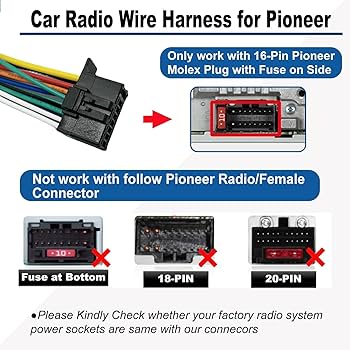
A wiring harness adapter simplifies the process. It plugs into your car’s factory wiring harness. This prevents cutting original wires and keeps the car intact. The adapter has color-coded wires that match Pioneer’s stereo wires.
Steps for using the adapter:
- Connect adapter wires to stereo wires by matching colors.
- Use crimp connectors or solder for secure joins.
- Plug the adapter into the car’s wiring harness.
This method saves time and reduces mistakes, especially for beginners.
Connecting Power And Ground Wires
The power and ground wires are vital for operation. Connect the yellow wire to a constant 12V source. This keeps the stereo memory active.
Attach the red wire to an accessory 12V source. This wire turns the stereo on with the ignition.
Ground the stereo by connecting the black wire to a clean metal surface on the car’s frame. A solid ground prevents noise and electrical issues.
Secure all connections tightly to avoid loose wires and power loss.
Hooking Up Speakers And Antenna
Speaker wires send audio signals to your car’s speakers. Connect each speaker’s positive and negative wires carefully. Match the stereo’s wire colors to the speaker wires.
Use speaker wire connectors or solder for strong connections. Avoid crossing positive and negative wires to prevent sound distortion.
Connect the antenna cable to the stereo’s antenna input. This ensures good radio reception. Make sure the connection is snug and secure.

Credit: usa.pioneer
Mounting The New Stereo
Mounting your new Pioneer car stereo is where everything starts to come together. This step ensures your stereo stays firmly in place and looks seamless with your car’s interior. Handling this correctly prevents any rattling sounds and keeps your stereo safe while driving.
Securing The Stereo In Dash
First, slide the new stereo into the dash opening carefully. Make sure the wiring harness is connected securely behind the unit to avoid loose connections.
Use the mounting brackets that came with your stereo or the existing ones from your old system. Tighten the screws evenly, but don’t overtighten—this can crack the dash or the stereo frame.
Do you feel the stereo fits snugly? A loose fit can cause vibrations and noise while driving. If needed, adjust the brackets slightly to ensure a firm hold without forcing the unit in.
Reattaching Trim And Panels
After the stereo is secured, it’s time to put the trim and panels back. These pieces not only finish the look but protect your wiring and installation from dust and damage.
Snap each panel gently into place. If you encounter resistance, check for any misaligned clips or screws that might block the fit. Using too much force risks breaking the plastic.
Once everything is back, give your dashboard a quick tap to confirm all parts are firmly seated. This final step often gets overlooked, but it’s crucial for a professional, clean finish.
Testing And Adjusting Sound
Testing and adjusting the sound is vital after installing your Pioneer car stereo. This process ensures clear audio and an enjoyable listening experience. Proper sound settings help balance volume, bass, treble, and other audio features. Checking these settings also prevents damage to your speakers. Follow these steps to power on, adjust audio, and fix common sound issues.
Powering On The Stereo
Start by turning on your car’s ignition. The Pioneer stereo should light up immediately. If it does not, check the wiring and fuse connections. Confirm the stereo’s display is active and responsive. Use the main power button on the stereo to switch it on. Wait a few seconds for the system to initialize. Listen for any startup sounds or welcome tones.
Adjusting Audio Settings
Access the stereo’s menu using the control buttons or touchscreen. Look for options like Volume, Bass, Treble, Balance, and Fader. Adjust the volume to a comfortable level first. Increase or decrease bass and treble to suit your music style. Set the balance to center the sound between left and right speakers. Use the fader control to adjust front and rear speaker output. Test different settings with various music tracks for best results.
Troubleshooting Common Issues
Check for no sound or weak sound from speakers. Confirm all speaker wires are connected properly. Inspect the fuse for any signs of damage or burnout. Reset the stereo to factory settings if strange sounds persist. Avoid setting volume too high to prevent distortion. Ensure the source device (phone, USB, CD) is working correctly. Consult the Pioneer manual for error codes or alerts. If problems continue, seek professional help to avoid damage.
Upgrading For Better Sound
Upgrading your Pioneer car stereo can greatly improve your driving experience. Better sound quality makes every trip more enjoyable. Small changes lead to big improvements in audio performance. Focus on key upgrades that enhance clarity, bass, and overall sound balance.
Adding Amplifiers And Subwoofers
Amplifiers boost the power of your stereo system. They deliver clearer and louder sound without distortion. Subwoofers handle low frequencies, adding deep bass to your music. Together, they create a richer and fuller audio experience.
Choose an amplifier that matches your stereo’s power output. Match subwoofer size and power to your vehicle’s space and needs. Proper installation ensures the best performance and prevents damage.
Using Sound Deadening Materials
Sound deadening materials reduce road noise and vibrations. This creates a quieter cabin for better sound clarity. They help speakers perform efficiently by minimizing sound loss.
Apply these materials inside doors, floor, and trunk areas. Use foam, mats, or sprays designed for automotive use. The result is cleaner sound and a more comfortable ride.
Credit: www.metrisforum.com
Frequently Asked Questions
How Do I Connect My Pioneer Car Stereo?
To connect your Pioneer car stereo, first, ensure the vehicle is off. Then, locate the wiring harness behind the stereo slot. Match the stereo’s wires with the harness, connecting them securely. Finally, slide the stereo into the dash, screw it in, and test for functionality.
What Tools Are Needed For Installation?
For installing a Pioneer car stereo, you’ll need a screwdriver, wire strippers, and crimping tool. A wiring harness adapter is also recommended. These tools help ensure a secure and proper connection, minimizing potential issues. Always follow the stereo’s manual for specific guidance tailored to your model.
Can I Install A Pioneer Stereo Myself?
Yes, you can install a Pioneer stereo yourself with basic tools. Follow the manual carefully to ensure correct wiring. If you’re unsure, consulting a professional can be beneficial. DIY installation can save you money and provide a sense of accomplishment once completed successfully.
Why Isn’t My Pioneer Stereo Turning On?
If your Pioneer stereo isn’t turning on, check the wiring connections first. Ensure all wires are securely connected and the fuse is intact. Verify the battery is supplying power. If issues persist, consult a professional or your stereo’s manual for troubleshooting steps.
Conclusion
Connecting your Pioneer car stereo is easier than you think. Follow each step carefully and take your time. Double-check all wires and connections before powering on. Test the stereo to ensure sound and functions work well. This simple process helps improve your car’s audio experience.
Enjoy clear music and easy controls on every drive. Stay patient and precise for the best results. Now, you can confidently install your Pioneer car stereo yourself.

