
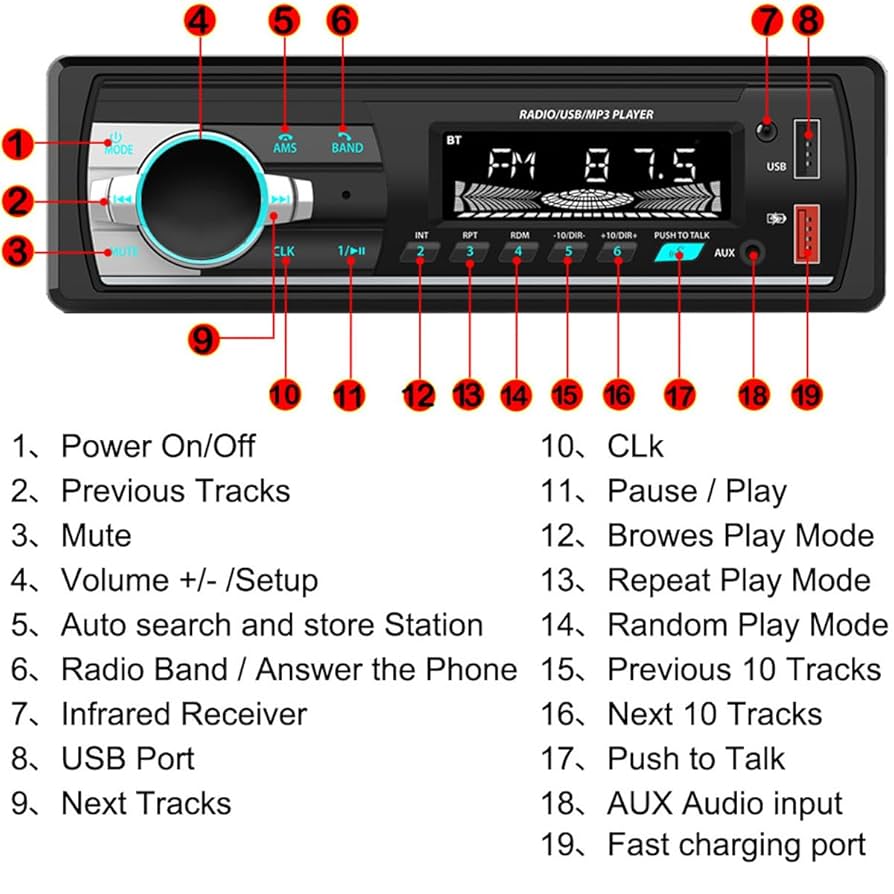
Do you want to enjoy your favorite MP3 songs while driving without any hassle? Connecting your MP3 player to your car stereo might seem tricky, but it’s easier than you think.
Whether you have a new or older car, there are simple ways to get your music playing loud and clear. Keep reading, and you’ll discover the best methods to make your car trips more fun with your personal playlist. Ready to turn your drive into a music experience you control?
Let’s dive in!

Credit: us.amazon.com
Choose The Right Connection Method
Choosing the right connection method is key to playing your MP3 player through a car stereo. Each way offers different features and ease of use. The best choice depends on your car stereo’s options and your MP3 player type. Understanding these connections helps you enjoy clear sound and smooth playback.
Auxiliary Input
The auxiliary input, or aux port, is a simple way to connect. Use a 3.5mm audio cable to link your MP3 player to the car stereo. It provides direct sound transmission without delay. Most cars have an aux port, often near the dashboard or center console. This method works well with any MP3 player with a headphone jack.
Bluetooth Pairing
Bluetooth offers a wireless connection option. Pair your MP3 player or smartphone with the car stereo using Bluetooth settings. No cables are needed, which means less clutter. It allows hands-free control and wireless music streaming. Sound quality depends on the Bluetooth version of both devices. Most modern cars and MP3 players support Bluetooth pairing.
Usb Connection
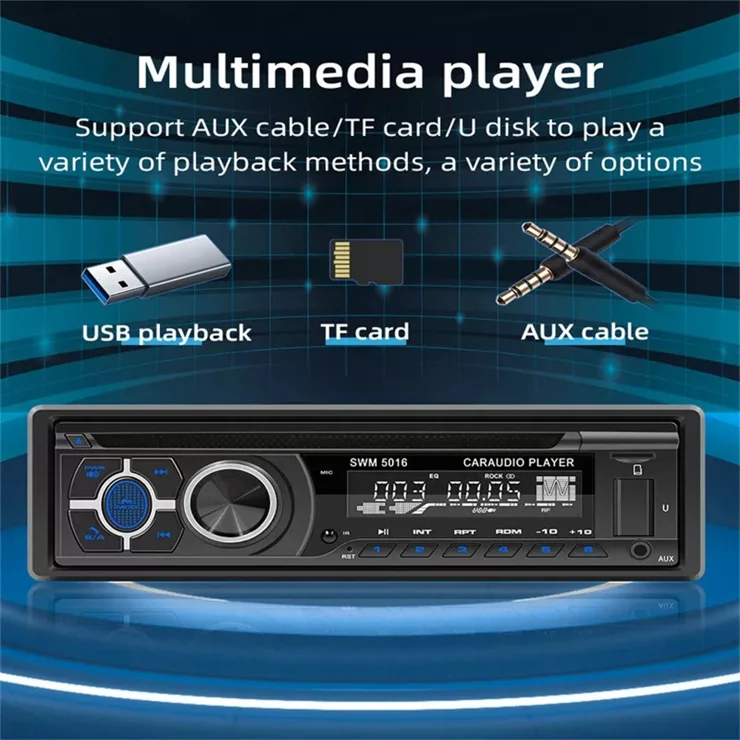
Connecting via USB provides both power and audio transfer. Plug your MP3 player or USB drive into the car stereo’s USB port. This method often supports control through the car’s interface. It can display song titles and playlists on the stereo screen. USB connections usually offer better sound quality than aux inputs.
Fm Transmitter Option
An FM transmitter sends audio through radio waves to your car stereo. Connect the MP3 player to the transmitter, which broadcasts on an unused FM frequency. Tune your car radio to that frequency to hear the music. This method works with any car radio but may face interference. It is useful when other connection options are unavailable.
Prepare Your Mp3 Player
Before you plug your MP3 player into your car stereo, it’s important to get it ready. A well-prepared device ensures smooth playback and a better listening experience. Let’s go through some key steps to make sure your MP3 player is set up perfectly for the road.
Charge Your Device
Nothing kills the vibe faster than your MP3 player dying mid-drive. Make sure your device is fully charged before you hit the road. If you’re planning a long trip, consider bringing a car charger as a backup to keep the music flowing.
Have you ever been stuck with no tunes because your battery ran out? Avoid that frustration by giving your player a full charge in advance.
Organize Your Playlist
Random songs can be fun, but a well-organized playlist saves you from fumbling while driving. Arrange your tracks by mood, genre, or even by the order you want to hear them. This way, you can focus on driving and enjoy your music without interruptions.
Think about your last drive—did you waste time searching for your favorite song? Preparing your playlist ahead lets you avoid that hassle.
Check Compatibility
Not all MP3 players connect to every car stereo system the same way. Check if your player supports the input options your car stereo accepts, such as AUX, USB, or Bluetooth. This prevents surprises and technical issues once you’re in the car.
Take a moment to review your car’s manual or test the connection beforehand. Are you sure your setup will work seamlessly when you plug in?
Connect Mp3 Player To Car Stereo
Connecting an MP3 player to a car stereo allows you to enjoy your favorite music on the road. There are several ways to link your device to the car’s audio system. Each method works with different car models and player types. Choose the best option based on your equipment.
Using Auxiliary Cable
An auxiliary cable is a simple and common way to connect an MP3 player. Locate the AUX input on your car stereo. Plug one end of the cable into your MP3 player’s headphone jack. Insert the other end into the car’s AUX port. Select the AUX mode on your car stereo to start playing music.
Pairing Via Bluetooth
Bluetooth offers a wireless connection between your MP3 player and car stereo. Turn on Bluetooth on both devices. Search for the car stereo on your MP3 player’s Bluetooth list. Select the stereo name to pair. Confirm the connection if needed. Play music from your MP3 player and enjoy wireless audio.
Plugging In Usb
Many modern car stereos support USB connections. Use a USB cable to connect your MP3 player to the car’s USB port. The stereo will recognize the device as a storage source. Use the car’s controls to browse and play your music files. This method also charges your MP3 player while playing.
Setting Up Fm Transmitter
An FM transmitter broadcasts music from your MP3 player to the car radio. Plug the transmitter into your player’s headphone jack or USB port. Set the transmitter to an unused FM frequency. Tune your car radio to the same frequency. Music plays through the car speakers without cables or Bluetooth.

Credit: www.ebay.com
Adjust Car Stereo Settingshttps://www.reddit.com/r/CarAV/comments/tj1tyy/im_trying_to_set_up_the_audio_of_my_car_it_has/
Adjusting your car stereo settings is key to enjoying clear and balanced sound from your MP3 player. The right adjustments can make a huge difference, whether you’re on a long drive or just running errands. Taking a moment to fine-tune the settings ensures your music sounds just the way you like it.
Select The Correct Input Source
Before anything else, make sure your car stereo is set to the right input source. This could be AUX, Bluetooth, USB, or even a CD player if you’re using a disc with MP3 files. If your stereo is on the wrong source, you won’t hear a thing from your MP3 player.
Check your stereo’s display or manual to find the input selection button. Sometimes it’s labeled as “Source,” “Mode,” or “Input.” Switching to the correct input is the first step to getting your music playing smoothly.
Optimize Sound Settings
Adjusting the bass, treble, and midrange can dramatically improve your listening experience. If your music sounds too harsh or flat, try tweaking these settings little by little. Many car stereos offer preset equalizer modes like “Rock,” “Jazz,” or “Pop,” but customizing your own can deliver better results.
Think about the type of music you play most. Do you prefer deep bass for hip-hop or clear vocals for podcasts? Use the sound settings to highlight what matters most to you.
Balance And Fade Adjustments
Balance controls the sound level between the left and right speakers, while fade adjusts it between the front and rear. If you usually drive alone, you might want to push the sound more to the front for a better listening experience. When you have passengers, a more even distribution can keep everyone happy.
Try adjusting these settings while playing your favorite track. Does the sound feel centered and full? Small tweaks here can prevent one side of the car from sounding louder or duller than the other.
Troubleshooting Common Issues
Running into issues while trying to play your MP3 player through your car stereo can be frustrating. However, many common problems have straightforward solutions that you can apply quickly. Understanding these issues helps you get back to enjoying your favorite tunes without delay.
No Sound From Mp3 Player
If your MP3 player is connected but you hear no sound, first check the volume on both the player and the car stereo. Sometimes the player is muted or the volume is set too low.
Also, ensure the connection cable or Bluetooth pairing is properly established. A loose AUX cable or an unpaired Bluetooth device often causes silence.
Have you tried switching the input mode on your stereo? Many cars have multiple input sources, and selecting the wrong one can result in no audio output.
Poor Audio Quality
Distorted or low-quality sound can ruin your listening experience. Check if the audio files themselves are of low bitrate or corrupted.
Worn or cheap cables often introduce static or crackling noises. Upgrading to a higher quality AUX cable can make a noticeable difference.
Interference from other electronic devices inside the car can also degrade audio quality. Try moving your MP3 player away from other gadgets or turning off nearby devices to see if the sound improves.
Connection Drops
If the music cuts in and out, the issue might be with the Bluetooth signal or cable connection. Wireless signals can weaken if there are obstacles or if you’re too far from the stereo.
Try reconnecting the device or using a different cable to see if the problem persists. Sometimes simply restarting both your MP3 player and car stereo resolves temporary glitches.
Are you in an area with heavy electronic interference, like near power lines or other strong signals? This can cause Bluetooth interruptions that are hard to avoid.
Compatibility Problems
Not all MP3 players work seamlessly with every car stereo. Check if your stereo supports the specific file formats your player uses.
Older stereos might not recognize newer devices or certain file types like FLAC or AAC. Converting your music files to a more universal format such as MP3 can help.
Firmware updates for your car stereo or MP3 player can solve many compatibility issues. Have you checked the manufacturer’s website for updates?
Enhance Your Listening Experience
Enhancing your listening experience in the car makes every drive more enjoyable. Clear sound and rich music can lift your mood. Small changes to your setup can greatly improve audio quality. Focus on simple upgrades that bring noticeable results.
Use Quality Audio Files
Choose high-quality audio files for better sound. MP3 files with higher bit rates sound clearer and richer. Avoid low-quality or heavily compressed files. Formats like FLAC or WAV offer even better audio fidelity. Good files make your music sound more natural and detailed.
Upgrade Car Audio System
Invest in better speakers for richer sound. Factory speakers often lack clarity and bass. Look for speakers with good frequency range and power handling. Consider replacing the head unit for more audio options. A modern stereo can support various inputs and improve sound control.
Add External Amplifiers
An external amplifier boosts audio power and clarity. It helps speakers perform at their best without distortion. Amplifiers increase volume without losing sound quality. Install an amplifier suitable for your car’s audio system. This upgrade creates deeper bass and clearer highs.
Credit: www.tvcmall.com
Frequently Asked Questions
How Can I Connect My Mp3 Player To My Car Stereo?
You can connect your MP3 player using an auxiliary cable. Plug one end into the MP3 player’s headphone jack. Insert the other end into the car stereo’s aux input. Set your car stereo to the auxiliary mode. Play your music from the MP3 player.
What Is The Best Way To Play Mp3s In My Car?
The best way to play MP3s is through a Bluetooth connection. Ensure your car stereo has Bluetooth capability. Pair your MP3 player with the car’s Bluetooth. This provides a wireless, clutter-free listening experience. Enjoy your favorite tracks effortlessly.
Can I Use A Usb Cable For Mp3 Playback?
Yes, if your car stereo supports USB input. Connect your MP3 player using a USB cable. Your car stereo will recognize the device. Navigate to the USB input mode on your stereo. Enjoy your music collection directly from your MP3 player.
Is It Possible To Use A Cassette Adapter?
Yes, a cassette adapter is an option for older stereos. Insert the adapter into the car’s cassette player. Connect the adapter to your MP3 player’s headphone jack. This allows you to play MP3s through the car stereo. It’s a simple and cost-effective solution.
Conclusion
Playing your MP3 player in the car stereo is simple and fun. Connect the device using cables, Bluetooth, or an adapter. Adjust the car stereo settings for the best sound. Keep your focus on driving while enjoying music. Try different connection methods to find what works best.
Music makes every drive better. Now, you can enjoy your favorite songs easily on the road.

