How to Adjust Amplifier Settings Car Audio: Ultimate Sound Guide
Are you struggling to get the perfect sound from your car audio system? Adjusting your amplifier settings can make a huge difference in how your music feels and sounds inside your vehicle.
But if you’re not sure where to start, it can quickly become confusing and frustrating. This guide will walk you through simple, clear steps to fine-tune your amplifier. By the end, you’ll know exactly how to make your music louder, clearer, and more powerful—turning every drive into an amazing audio experience.
Keep reading, and take control of your car’s sound like a pro.
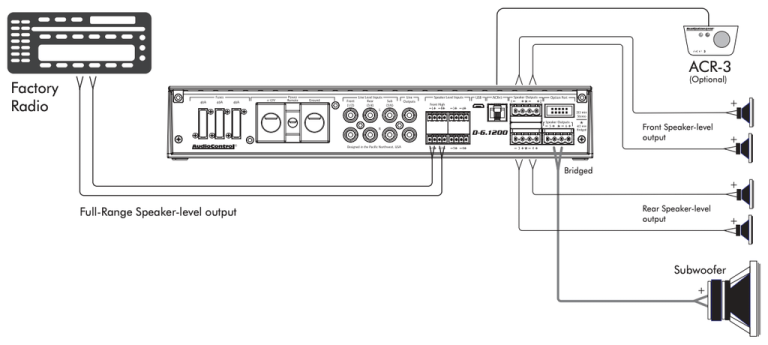
Credit: www.diymobileaudio.com
Choosing The Right Amplifier
Choosing the right amplifier is essential for a great car audio experience. The amplifier controls the sound quality and power sent to your speakers. Picking one that fits your setup helps avoid damage and ensures clear sound. Understanding different types and power ratings makes the choice easier.
Types Of Amplifiers
There are three main types of amplifiers:
- Class A/B:Common and reliable, good for most setups.
- Class D:Compact and efficient, ideal for subwoofers.
- Monoblock:Single-channel amps, perfect for powering subwoofers.
Each type serves a specific purpose. Match the amplifier type to your audio needs.
Matching Amplifier To Speakers
Speakers need an amplifier that fits their power and impedance. Check your speaker’s wattage and ohm rating before buying an amp. Using an amp with too much power can damage speakers. Too little power causes weak sound and distortion. Balance is key for clear and loud audio.
Power Ratings Explained
Amplifier power ratings show how much power it delivers. Look for two key ratings:
- RMS Power:Continuous power the amp can provide safely.
- Peak Power:Maximum power for short bursts.
RMS power is more important for matching to speakers. Choose an amp with RMS power close to your speaker’s rating. This ensures consistent performance without damage.
Essential Tools For Adjustment
Adjusting your car amplifier settings precisely requires the right tools. These tools help you measure, test, and fine-tune audio performance for the best sound experience. Without them, you’re mostly guessing, which can lead to poor sound quality or even damage to your equipment.
Multimeter And Test Equipment
A multimeter is essential for checking electrical values like voltage, resistance, and continuity in your car audio system. It helps ensure your amplifier is getting the correct power and that all connections are sound. Testing speaker impedance with a multimeter can prevent damage caused by mismatched loads.
Besides the multimeter, having a set of quality test leads and probes is important. They allow you to reach tight spots behind the dashboard or amplifier box safely and accurately. Imagine spending hours troubleshooting only to find a loose wire; these tools save you that headache.
Signal Generators
Signal generators produce specific audio frequencies to test how your amplifier responds. Using a sine wave test tone lets you identify distortion or frequency drop-offs. This is crucial for adjusting crossover points and gain levels accurately.
Some modern signal generators are compact and easy to use with smartphones or laptops. This convenience means you can test your system without bulky equipment. Have you ever listened to a test tone and noticed how much clearer your bass or treble can get? That’s the power of a good signal generator.
Head Unit Controls
Your car’s head unit controls are your first line of adjustment. They let you tweak volume, balance, fade, bass, midrange, and treble before making amplifier changes. Understanding these controls helps you set a solid foundation for fine-tuning.
Many head units now include built-in equalizers and time alignment features. Using these can reduce the need for extreme amplifier adjustments. How often do you explore every setting on your head unit? Taking time here can drastically improve your overall sound.
Setting Gain Levels
Setting gain levels on your car amplifier is crucial for achieving clear, powerful sound without damaging your speakers. Too low, and your audio might sound weak or quiet. Too high, and distortion or speaker damage can occur. Let’s look at how you can find the perfect balance.
Finding The Optimal Gain
Start by turning your gain knob all the way down. Play a familiar song with a wide range of sounds at a moderate volume. Slowly increase the gain until you hear the first hint of distortion, then back it off slightly.
This method ensures you’re maximizing your amplifier’s power without pushing it too hard. Imagine adjusting the gain like tuning a guitar string—you want it tight enough for clear sound but not so tight it breaks.
Avoiding Distortion
Distortion often sneaks in when the gain is set too high. It sounds like crackling or harsh fuzz, especially during bass-heavy parts. If you notice this, lower your gain immediately.
Listen carefully during different songs and volume levels. Distortion doesn’t just ruin the sound; it can permanently damage your speakers. Protect your investment by trusting your ears over just pushing the gain to the max.
Balancing Volume And Clarity
High volume doesn’t always mean better sound. Sometimes, clarity suffers as you crank up the gain too much. Aim for a setting where the bass hits hard, but vocals and instruments stay crisp.
Try adjusting your amplifier gain in small increments while playing different music styles. Pay attention to whether the sound stays balanced or if any frequencies start to overpower others. Your goal is a smooth, enjoyable listening experience at any volume.
Adjusting Crossover Settings
Adjusting crossover settings is a key step to getting the best sound from your car’s audio system. These settings control which frequencies go to your speakers and subwoofer, making sure each driver handles the sounds it’s designed for. Proper adjustment can prevent distortion and improve clarity, so you hear music the way it was meant to be heard.
High-pass Vs Low-pass Filters
High-pass filters (HPF) let higher frequencies pass through while blocking lower ones. They’re usually set on door speakers or tweeters to protect them from deep bass that can cause damage. Low-pass filters (LPF), on the other hand, do the opposite—they allow low frequencies through and block higher ones, which is perfect for subwoofers.
Think about your own setup: if your door speakers sound muddy, your HPF might be off. Adjusting these filters helps each speaker focus on the sounds it handles best. Are you letting your speakers compete over the same frequencies?
Setting Crossover Frequencies
Choosing the right crossover frequency depends on your speaker sizes and types. A common starting point is around 80 Hz for subs and 80-100 Hz for door speakers. But this isn’t a fixed rule—you’ll want to tweak based on your system’s components and your listening preferences.
Try small adjustments and listen carefully. If the bass feels disconnected or the mids sound thin, tweak the frequency up or down. Sometimes, shifting just 10 Hz can make a big difference in how smoothly your system blends.
Improving Speaker Performance
Proper crossover settings reduce distortion and protect your speakers from damage. When your speakers aren’t forced to play frequencies they can’t handle, their sound becomes cleaner and more dynamic. This also means your amplifier works more efficiently, delivering power where it’s needed most.
Have you noticed clearer vocals or punchier bass after adjusting your crossover? That’s the result of letting each speaker play within its sweet spot. Don’t settle for default settings—your ears will thank you for fine-tuning this crucial aspect of your audio system.
Tuning Bass And Treble
Tuning bass and treble is essential for getting the most out of your car audio amplifier. Adjusting these settings correctly helps balance the low and high frequencies, giving you a richer and clearer sound experience. Let’s look at how you can fine-tune these controls effectively to match your music preferences and car environment.
Using Equalizer Controls
Your amplifier’s equalizer controls let you adjust bass and treble levels directly. Start by setting all controls to the middle or neutral position to hear the baseline sound. Then, gradually increase or decrease the bass and treble sliders to find the sweet spot where the music feels full without distortion.
Listen carefully to different genres of music. Rock may benefit from boosted bass, while classical might sound better with slightly enhanced treble. Experiment with small adjustments, as dramatic changes can quickly ruin the balance.
Avoiding Over-boosting
It’s tempting to crank up the bass or treble, but over-boosting can cause unpleasant distortion or damage your speakers. If you notice the sound becoming muddy or harsh, dial back the levels immediately. Your ears are the best judge—trust them over what looks good on the dial.
Try to keep boosts within 3 to 6 dB above the neutral setting. Anything more might push your amplifier or speakers beyond their optimal performance range. Have you ever blasted bass only to find it rattles your car’s interior rather than enhancing music? That’s a clear sign to reduce the boost.
Enhancing Sound Quality
Fine-tuning bass and treble isn’t just about louder lows or sharper highs—it’s about clarity and balance. After setting your equalizer, play a variety of tracks and notice if vocals, instruments, and effects stand out cleanly without overpowering each other.
Use your car’s acoustics to your advantage. Positioning your speakers or adding sound dampening materials can complement your amplifier settings. Remember, good sound quality comes from the harmony between your settings and your car’s environment, not from one alone.
Time Alignment And Phase
Time alignment and phase are key settings for your car audio amplifier. They help your speakers work together. This creates clear and balanced sound inside your vehicle. Adjusting these settings improves the listening experience.
Aligning Speaker Timing
Speakers are placed at different distances from the listener. This causes sound to reach ears at different times. Time alignment delays some speakers. This lets all sounds arrive simultaneously. The result is sharper and more accurate audio.
Use the amplifier’s time alignment controls. Measure the distance from each speaker to the listener. Enter these values to adjust the delay. This makes the soundstage more natural and focused.
Correcting Phase Issues
Phase problems occur when speaker cones move in opposite directions. This causes sound waves to cancel each other out. The result is weak bass or hollow sounds. Use the phase control to fix this.
Flip the phase setting from 0° to 180° if needed. Listen carefully for stronger bass and clearer sound. Adjust in small steps to find the best setting.
Creating A Cohesive Soundstage
Time alignment and phase work together to build a cohesive soundstage. This means sounds seem to come from a single space. Instruments and voices become clear and lifelike.
A good soundstage makes music enjoyable and immersive. It reduces listener fatigue on long drives. Take time to adjust these settings and enjoy better audio quality.
Testing And Fine-tuning
Testing and fine-tuning your car amplifier settings is where the real magic happens. This step transforms raw adjustments into a sound experience tailored perfectly to your ears and your vehicle. Without careful testing, even the best equipment won’t deliver its full potential.
Using Test Tracks
Choose test tracks with clear bass, mids, and highs to evaluate your amplifier’s performance. Tracks that you know well help you notice small differences as you tweak settings. Music with a steady beat and a variety of instruments works best.
Play the test tracks at a moderate volume first. Listen closely for distortion, muddiness, or missing frequencies. Adjust your gain, bass boost, and crossover settings while the music plays to hear real-time changes.
Adjusting On The Go
Fine-tuning isn’t just about sitting still—it’s about how your system sounds while driving. Road noise, cabin acoustics, and speed can all affect audio quality. Take your car for a short drive and listen carefully to how the sound shifts.
Make small adjustments to the amplifier settings during your drive. If you notice the bass is overpowering on rough roads, lower the gain slightly. If vocals fade when you hit highway speeds, tweak your midrange settings to compensate.
Common Mistakes To Avoid
- Setting gain too high:This causes distortion and can damage speakers. Aim for a clean, loud sound without clipping.
- Ignoring speaker limits:Match your amplifier settings to your speaker’s capabilities to avoid blown drivers.
- Not using quality test tracks:Poor audio files mask issues and make tuning harder.
- Rushing adjustments:Take your time to hear the subtle differences each change makes.
Have you ever felt your car audio lacked punch or clarity despite good equipment? Testing and fine-tuning might be the missing piece. Are you ready to hear your music exactly how it should sound?

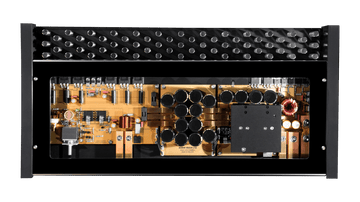
Credit: www.youtube.com
Maintaining Your Amplifier
Keeping your amplifier in top shape is key to enjoying clear, powerful sound in your car. Neglect can lead to poor performance or even damage, which nobody wants after investing in quality audio gear. A little attention and care go a long way in extending your amplifier’s life and ensuring it delivers the best audio experience.
Regular Checks And Cleaning
Dust and dirt can build up on your amplifier’s connections and vents, causing poor performance or overheating. Make it a habit to inspect your amplifier every few weeks. Use a soft brush or compressed air to clean dust off the surface and around the terminals.
Check all wiring for loose connections or frayed insulation. A secure connection prevents signal loss and possible shorts. Have you noticed any crackling sounds or sudden volume drops? That could be a sign to check your cables and clean the contacts.
Protecting From Overheating
Amplifiers generate heat, especially during heavy use. Without proper ventilation, this heat can build up and damage internal components. Position your amplifier where air flows freely and avoid stacking items on top of it.
Consider adding a cooling fan or heat sinks if you often play music at high volumes. Some amplifiers come with built-in thermal protection; if yours doesn’t, think about upgrading to one that does. Have you ever felt your amp getting too hot to touch? That’s a clear warning sign to improve its cooling.
Upgrading Components
Sometimes, simple upgrades can boost your amplifier’s performance and reliability. Swapping out old wiring for higher quality cables can reduce signal loss and noise. Also, upgrading to better connectors like gold-plated terminals can improve durability and conductivity.
If your amplifier is several years old, check if newer models offer better efficiency or enhanced features such as remote gain control or improved thermal management. Investing in these upgrades can save you from costly replacements in the long run. What small change could you make today to get clearer, stronger sound from your system?

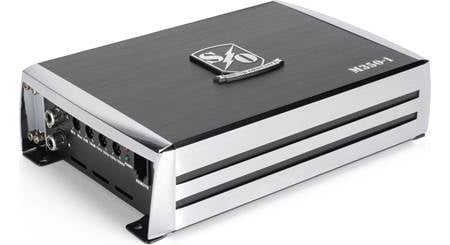
Credit: www.reddit.com
Frequently Asked Questions
How To Properly Set Car Amplifier Gain?
To set your car amplifier gain, start by turning the gain knob to the lowest setting. Play music and gradually increase the gain until you hear distortion. Once distortion occurs, slightly reduce the gain until the sound is clear. This ensures optimal sound quality without damaging speakers.
What Is The Best Eq Setting For Car Audio?
The best EQ setting varies based on personal preference and music genre. Start with a flat EQ, then adjust bass, midrange, and treble to your liking. Increase bass for hip-hop, enhance midrange for vocals, and boost treble for clarity. Experiment to find your perfect sound.
Why Does My Amplifier Overheat?
An amplifier may overheat due to improper ventilation, incorrect gain settings, or excessive power demands. Ensure your amplifier is in a well-ventilated area, check gain settings, and verify your speakers match the amplifier’s power output. Regularly clean dust from vents to maintain airflow.
How To Avoid Amplifier Distortion?
To avoid distortion, set the gain correctly and ensure the amplifier’s power matches speaker requirements. Avoid excessive volume levels and keep the EQ settings balanced. Regularly inspect connections for any loose wires and maintain amplifier and speaker cleanliness for optimal performance.
Conclusion
Adjusting your car amplifier settings improves sound quality greatly. Start with basic controls like gain, bass, and treble. Small changes make a big difference in listening experience. Always test your adjustments at different volumes. Trust your ears to find the best balance.
Keep your settings simple and clear. Enjoy cleaner, richer sound on every drive. Regularly check and fine-tune for consistent performance. Simple steps lead to better car audio.