How to Fix Buzzing Sound in Car Speakers: Easy DIY Solutions
Is your car’s music ruined by an annoying buzzing sound? That constant buzz can turn every drive into a frustrating experience.
You don’t have to live with it or spend a fortune on repairs. You’ll discover simple, effective ways to fix the buzzing sound in your car speakers. Keep reading, and by the end, you’ll know exactly what’s causing the noise and how to stop it for good.
Your favorite songs deserve to sound clear and crisp—let’s make that happen.

Credit: www.reddit.com
Common Causes Of Buzzing
Buzzing sounds in car speakers can be frustrating and distracting. Understanding the common causes helps you pinpoint the problem and fix it faster. Let’s look at the typical reasons behind that annoying buzz in your car’s audio system.
Loose Speaker Connections
Loose or poorly connected wires can create a buzzing noise in your speakers. Over time, vibrations from driving can loosen these connections without you noticing. Check the speaker terminals and wiring harness for any signs of looseness or corrosion.
Have you ever wiggled a wire and suddenly the sound cleared up? That’s a clear sign a connection needs tightening or cleaning. Secure connections ensure a steady flow of audio signals and eliminate buzzing.
Electrical Interference
Electrical interference often causes buzzing in car speakers, especially when the engine is running. This happens because other electrical components—like alternators or ignition systems—emit signals that interfere with your audio system.
Try turning on different electrical devices in your car one at a time. Notice if the buzzing changes or stops? This can help identify the source of interference. Shielding cables or rerouting wires might be necessary to reduce this noise.
Damaged Speaker Components
Physical damage to the speaker’s cone or coil can cause distortion and buzzing sounds. Even small tears or dents affect the way sound waves travel through the speaker. If your speaker has been exposed to moisture or heavy use, damage is more likely.
Inspect your speakers closely for visible damage. You might hear buzzing only at certain volumes or frequencies, which points to internal speaker issues. Replacing damaged components often restores clear sound.
Faulty Car Audio System
The problem might not be with the speakers but the car’s audio system itself. Faulty amplifiers, head units, or wiring inside the system can introduce buzzing noise. Software glitches or outdated firmware can also affect sound quality.
Have you updated your car stereo’s firmware recently? If not, this might be a quick fix. Otherwise, professional testing of your audio system components can uncover faults that need repair or replacement.

Credit: m.youtube.com
Tools Needed For Diy Fixes
Fixing a buzzing sound in your car speakers can be straightforward if you have the right tools at hand. Before you dive into the repair, gather essential equipment that helps you diagnose and solve the issue efficiently. Having these tools ready saves time and avoids unnecessary guesswork.
Basic Hand Tools
Start with simple hand tools like screwdrivers, pliers, and wire strippers. These help you open speaker panels and handle wiring without damaging components. A small flashlight can also be handy for inspecting dark or cramped areas inside your car’s doors or dashboard.
Do you have a reliable set of screwdrivers? Often, buzzing arises from loose connections, and tightening screws can solve the problem quickly. Keeping these basic tools nearby makes it easier to act fast.
Multimeter For Testing
A multimeter is crucial for checking electrical continuity and voltage levels in your speaker wiring. It helps you identify faulty wires or grounding problems, which are common causes of buzzing sounds. Using a multimeter can prevent unnecessary part replacements.
Not sure if your speaker wires have a short circuit? A quick test with a multimeter will reveal the issue instantly. Investing in this tool is worthwhile if you plan to troubleshoot car audio problems more than once.
Audio Testing Apps
Modern smartphones offer audio testing apps that can generate test tones and measure sound quality. These apps help you isolate the buzzing frequency and pinpoint whether the problem is with the speaker or the audio source. They’re simple to use and free or low-cost.
Ever tried playing a pure tone through your speakers to catch distortion? Audio testing apps make it easy to conduct this check yourself. Using these digital tools can speed up your diagnosis before you start dismantling anything.
Checking And Securing Connections
Buzzing sounds from your car speakers often trace back to loose or faulty connections. Checking and securing these connections can quickly eliminate unwanted noise and improve sound clarity. Before considering expensive replacements, spend some time examining how your speakers are wired and connected.
Inspecting Speaker Wires
Start by visually inspecting the wires connected to your speakers. Look for frayed insulation, broken strands, or any signs of wear that could cause interference. Gently wiggle the wires and listen for changes in the buzzing—this can help pinpoint if a damaged wire is the culprit.
Have you noticed that some wires are harder to trace because they run behind panels? Carefully removing these panels can give you better access and make inspection easier. Remember, damaged wires often mean sound issues, so don’t overlook even small cuts or cracks.
Tightening Connectors
Loose connectors are a common source of buzzing. Make sure all speaker terminals and plugs are tightly secured. If you find any connectors that feel loose or move when touched, firmly tighten them without forcing to avoid damage.
Sometimes, connectors might look secure but still cause buzzing due to poor contact. Try unplugging and plugging them back in to ensure a solid connection. This simple step has solved sound issues for many car owners, including myself during a recent weekend fix.
Cleaning Corroded Contacts
Corrosion on speaker contacts can disrupt signal flow and cause buzzing. Use a small brush or a cotton swab dipped in isopropyl alcohol to gently clean the contacts. Avoid excessive moisture and ensure the contacts dry completely before reconnecting.
Have you ever seen green or white buildup on connectors? That’s corrosion, and it’s a silent sound saboteur. Regular cleaning can prevent this buildup and maintain crisp sound quality over time.

Credit: abcadvancedauto.com
Reducing Electrical Interference
Electrical interference is often the hidden culprit behind that annoying buzzing sound in your car speakers. It sneaks in through wiring and components, disrupting the clean audio signal you expect. Tackling this interference can dramatically improve your listening experience and bring clarity back to your favorite tunes.
Separating Power And Audio Cables
One simple but effective way to reduce buzzing is to keep your power and audio cables apart. Power cables carry high current, which can induce noise in nearby audio lines.
Try routing your audio cables on one side of the car and the power cables on the other. Even a few inches of separation can make a noticeable difference.
Have you checked how your cables are laid out under your dashboard? A quick rearrangement might be all it takes.
Using Noise Filters
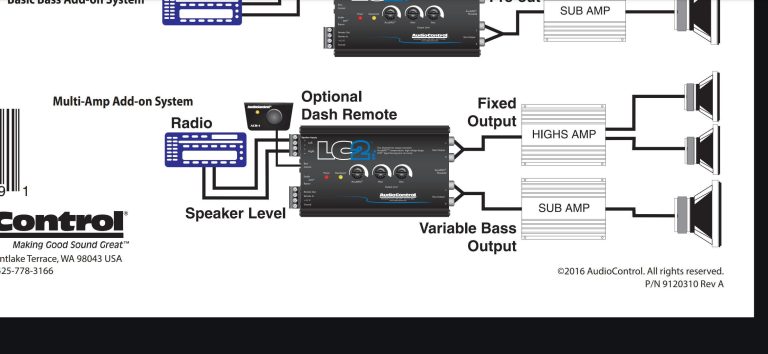
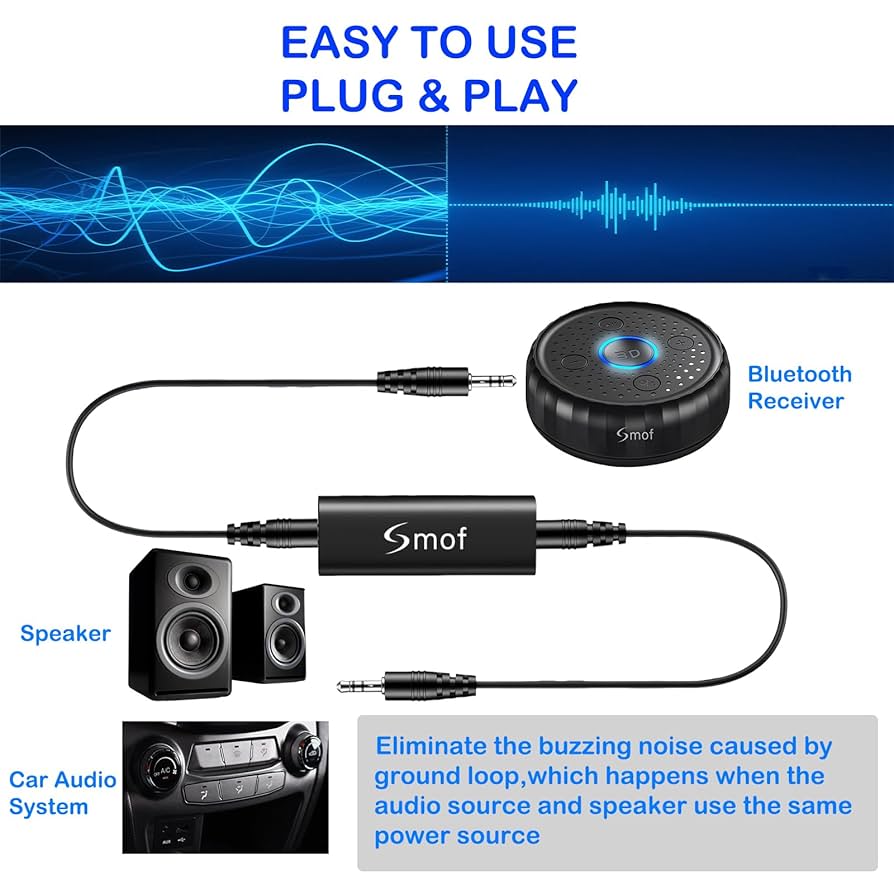
Noise filters are designed to block unwanted electrical signals from reaching your speakers. They act like a barrier, stopping interference caused by your vehicle’s electrical system.
You can add inline noise filters to your speaker wires or at the power source. Many car audio shops offer affordable filters that are easy to install.
Think about the last time your buzzing disappeared after a quick fix—could a noise filter be the permanent solution you need?
Shielding Speaker Wires
Shielded speaker wires have an extra layer of protection against electrical interference. This shielding absorbs or deflects unwanted noise before it reaches your speakers.
Replacing your current speaker wires with shielded ones is a smart upgrade if interference persists. You can also wrap existing wires in foil tape or use special shielding sleeves.
Imagine enjoying your music without that persistent buzz—shielding your wires might be the step that makes it possible.
Repairing Or Replacing Speakers
Repairing or replacing your car speakers can bring your audio system back to life and eliminate that frustrating buzzing sound. Sometimes, a quick fix is all you need, but other times, the damage runs deeper and replacement is the best option. Understanding the condition of your speakers is key to deciding the right approach.
Identifying Speaker Damage
Start by inspecting your speakers carefully. Look for visible signs like torn cones, loose wiring, or corrosion around the speaker terminals. Play audio at different volumes and listen closely for distortion or crackling that wasn’t there before.
Ask yourself: does the buzzing happen only at high volumes or all the time? This can help pinpoint if the speaker itself is damaged or if it’s an issue with wiring or the audio source.
Simple Speaker Repairs
Small tears or holes in the speaker cone can often be fixed with a bit of glue or tape designed for speaker repair. Reattaching a loose surround or tightening connections can also reduce buzzing.
Sometimes, cleaning the speaker terminals with a contact cleaner improves sound quality significantly. If you’re comfortable with basic tools, reseating or replacing speaker wires can solve intermittent buzzing problems.
When To Replace Speakers
Speakers that have large tears, severe cone damage, or burnt voice coils usually need replacement. If repair attempts don’t stop the buzzing, replacement is the safer bet to protect your car’s audio system.
Consider upgrading if your current speakers are old or low quality. New speakers offer better sound clarity and durability, eliminating buzzing for good. What’s your priority: a quick fix or long-term sound improvement?
Adjusting Audio System Settings
Adjusting your car’s audio system settings can often fix buzzing sounds in the speakers. The audio settings control how sound is delivered. Small tweaks may reduce or stop unwanted noise. Focus on balancing, volume, and equalizer settings for better sound quality.
Balancing Sound Levels
Balance controls the sound between the left and right speakers. If one side is louder, it may cause buzzing. Move the balance slider to the center. This spreads sound evenly and lowers strain on any speaker. Also, adjust the fader to balance front and rear speakers. Proper balance helps reduce distortion and buzzing.
Reducing Gain And Volume
High gain or volume can cause speakers to buzz or distort. Turn the volume down to a moderate level. Check the gain settings in your amplifier or head unit. Lowering gain reduces the chance of overloading speakers. Avoid maxing out volume or gain. This keeps sound clear without buzzing or crackling.
Using Equalizer Settings
The equalizer changes sound frequencies. Some frequencies may cause buzzing. Reduce bass or midrange levels slightly. Test different EQ presets like “rock” or “pop” to find one without buzzing. Avoid boosting bass too much, as it strains speakers. Using EQ wisely improves sound quality and stops buzzing noise.
Preventing Future Buzzing Issues
Preventing future buzzing issues in car speakers keeps your music clear and your drives enjoyable. Small actions can stop buzzing before it starts. Consistent care and smart choices protect your audio system and save money on repairs.
Regular Maintenance Tips
- Check speaker connections often for loose wires or corrosion.
- Clean speaker grills and surrounding areas to avoid dust buildup.
- Keep your car’s electrical system healthy; weak batteries cause noise.
- Turn off electronics one by one to find and fix interference.
- Inspect speaker cones for damage and replace if necessary.
Choosing Quality Audio Components
Invest in speakers and amplifiers from trusted brands. Quality parts reduce the chance of buzzing and last longer. Avoid cheap wiring that can cause interference or shorts. Match components to your car’s electrical system for best results.
Professional Inspection Recommendations
Schedule regular checkups with car audio specialists. Experts detect hidden problems that cause buzzing sounds. They test wiring, grounding, and system compatibility. Early detection stops small issues from becoming costly repairs. Professional tuning improves sound quality and system stability.
Frequently Asked Questions
Why Do My Car Speakers Buzz?
Buzzing car speakers can result from loose connections, electrical interference, or damaged components. Poor grounding is another common cause. Identifying the root of the issue is essential for fixing it effectively. Regularly checking and maintaining your car’s audio system can help prevent buzzing noises.
How Can I Stop Speakers From Buzzing?
To stop buzzing, check all connections and ensure they’re secure. Inspect for any loose wires or damaged components. Consider installing a noise filter to reduce electrical interference. Regular maintenance and troubleshooting can help keep your car speakers working optimally without annoying buzzing sounds.
Is The Buzzing Sound Due To A Bad Ground?
Yes, a bad ground can cause buzzing in car speakers. Ensuring a proper ground connection is crucial for optimal audio performance. A poor ground can lead to electrical interference, resulting in unwanted noise. Regularly check and maintain your car’s grounding to avoid such issues.
Can Electrical Interference Cause Speaker Buzzing?
Electrical interference is a common cause of buzzing in car speakers. Devices like mobile chargers can introduce noise. To mitigate this, use quality cables and consider installing a noise filter. Regular maintenance and proper equipment can help reduce interference-related buzzing.
Conclusion
Fixing a buzzing sound in car speakers is easier than it seems. Check cables and connections first. Clean or replace any worn parts. Adjust the audio settings carefully. Try these steps one by one. Small fixes often solve big problems.
Enjoy clear sound on every drive. Keep your car audio in good shape. Simple care helps your speakers last longer. Don’t let buzzing ruin your music experience. Take action and hear the difference today.