How to Upgrade Android Car Stereo: Easy Steps for Ultimate Sound
Are you tired of your car stereo feeling outdated and missing out on the latest features? Upgrading your Android car stereo can completely transform your driving experience.
Imagine having seamless navigation, crystal-clear sound, and easy access to your favorite apps—all right at your fingertips. In this guide, you’ll discover simple steps to upgrade your car stereo without any hassle. Whether you’re a tech novice or a car enthusiast, you’ll learn everything you need to know to make the switch smoothly and confidently.
Keep reading to unlock the full potential of your car’s audio system!
Choosing The Right Android Stereo
Choosing the right Android car stereo can transform your driving experience. It’s more than just picking a device; it’s about finding one that fits your lifestyle, your car, and your tech needs. Let’s break down the important points to consider so you end up with the perfect match.
Key Features To Look For
Start by thinking about what you really want from your Android stereo. Do you need navigation, Bluetooth, or maybe support for voice commands? Some models come with large touchscreens, while others prioritize sound quality or app compatibility.
Look for features like:
- Screen size and resolution—bigger screens offer better visibility but take more space.
- Connectivity options—USB, Bluetooth, Wi-Fi, and even 4G support.
- Compatibility with apps—Google Maps, Spotify, or your favorite podcasts.
- Audio settings—equalizers, subwoofer controls, and amplifier support.
Think about what you use daily in your current setup and what’s missing. Have you ever struggled with a tiny screen or poor sound? That’s a clue on what to prioritize.
Compatibility With Your Vehicle
Not every Android stereo fits every car. Your vehicle’s make, model, and year matter a lot. Check the stereo’s size—single DIN or double DIN—and whether it matches your car’s dashboard space.
Also, consider wiring harness compatibility. Some stereos connect easily with factory wiring, while others might require adapters or extra work. Ask yourself: Do you want a simple plug-and-play install, or are you okay with a bit of DIY?
If your car has steering wheel controls or backup cameras, ensure the stereo supports these features. Missing out on these can make your upgrade less convenient than expected.
Budget Considerations
How much are you ready to spend? Android car stereos range from affordable basics to premium models packed with extras. Set a clear budget before you start shopping to avoid getting overwhelmed.
Remember, the cheapest option might lack important features or durability. On the other hand, the most expensive models aren’t always worth the price if you don’t need all the bells and whistles.
Think about what you use most in your car stereo. Would you rather invest in better sound quality or a bigger screen? Balancing your needs and budget will help you find the best value.
Tools And Materials Needed
Upgrading your Android car stereo requires specific tools and materials. Having the right items makes the process smoother and safer. Prepare everything before starting to avoid interruptions.
Essential Tools List
- Phillips screwdriver – for removing screws
- Flathead screwdriver – to pry off panels gently
- Panel removal tool – prevents damage to trim
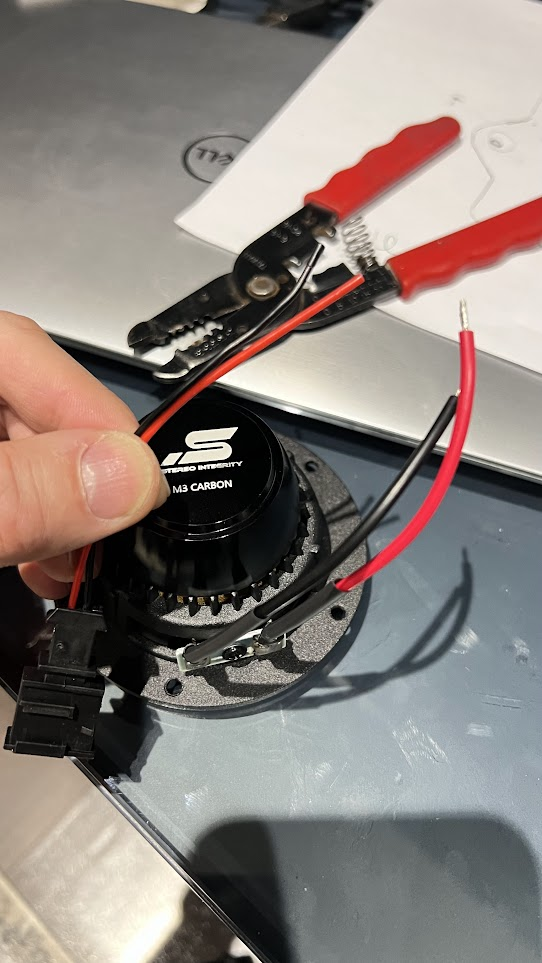
- Wire strippers – for clean wire connections
- Electrical tape – secures wiring safely
- Socket wrench set – loosens bolts if needed
- Multimeter – checks electrical connections
- Crimping tool – for strong wire terminals
Optional Accessories
- Wiring harness adapter – simplifies connections
- Dash kit – fits the new stereo perfectly
- Bluetooth microphone – improves hands-free calling
- USB extension cable – adds convenient charging spots
- Backup camera – enhances safety during reversing
Preparing Your Car For Installation
Before you dive into upgrading your Android car stereo, setting up your car properly can save you a lot of headaches. Preparation is more than just a quick disconnect; it’s about creating a safe workspace and ensuring a smooth transition from the old system to the new one. Let’s look at the essential steps to get your car ready for the install.
Disconnecting The Battery
Safety is your top priority. Disconnecting the battery prevents electrical shorts and protects both you and your car’s electronics.
Locate your car’s battery—usually under the hood. Use a wrench to loosen the negative terminal first; this stops the flow of electricity.
Have you noticed how many people skip this step, only to end up with blown fuses or worse? Taking this simple precaution helps avoid those costly mistakes.
Removing The Old Stereo
Removing the factory stereo can be tricky if you don’t know where to look. Start by carefully prying off the trim panels around the dashboard.
Use a plastic tool to avoid scratching surfaces, and keep screws and clips in a small container so nothing gets lost.
Once the trim is off, you’ll see the screws holding the stereo in place. Unscrew them, then gently pull the stereo out to expose the wiring behind.
Handling Wiring Harnesses
Wiring harnesses are the bridge between your car and stereo. Handle them with care to prevent damage or confusion during installation.
Label each connector or take a photo before disconnecting to make reassembly easier. If your new stereo includes a harness adapter, it will simplify this process by matching factory plugs.
Ever struggled to figure out which wire goes where? A little organization here can save hours of frustration later on.
Installing The New Android Stereo
Installing the new Android stereo is a key step to enhance your car’s audio experience. It needs careful handling to ensure all parts fit and work well. Follow clear steps to connect, secure, and power the stereo correctly.
Connecting Wiring Harnesses
Start by matching the wiring harnesses from the car to the stereo. Each connector has a specific shape and color code. This makes it easy to find the right pairs.
- Check that all wires are intact and not damaged.
- Connect the power wire first to avoid shorts.
- Plug in the speaker wires carefully to maintain sound quality.
- Attach any additional connectors for USB, Bluetooth, or antenna.
Secure the connections with electrical tape or wire connectors. Loose wires can cause malfunctions or noise.
Securing The Stereo Unit
Place the stereo unit into the dashboard opening. Align it with the mounting brackets or slots.
- Slide the stereo in until it clicks or fits snugly.
- Use screws to fasten the unit firmly in place.
- Double-check the fit to avoid rattling during driving.
- Attach the faceplate or trim to complete the look.
Reconnecting The Battery
Reconnect the car battery to restore power to the stereo. This step activates the system for testing.
- Attach the positive terminal first, then the negative.
- Tighten the terminal clamps to prevent sparks.
- Turn on the car ignition to test the stereo functions.
- Check sound, screen, and controls for proper operation.
Disconnect the battery again if any issues occur. Fix wiring or mounting problems before final use.
Setting Up And Customizing
Setting up and customizing your new Android car stereo makes a big difference in your driving experience. A proper setup ensures the system runs smoothly and fits your preferences. Customizing options help you enjoy music, navigation, and apps in a way that suits you best.
Initial System Setup
Turn on the car stereo and follow the on-screen instructions. Choose your preferred language and connect to Wi-Fi or mobile data. Sign in with your Google account to access all features. Set the date and time accurately for better app performance. Allow necessary permissions for apps to work correctly.
Adjusting Sound Settings
Access the sound menu to adjust bass, treble, and balance. Use equalizer presets or create your own settings. Adjust volume levels for different zones if available. Enable features like surround sound or loudness enhancement for better audio. Test the settings by playing your favorite music to ensure clarity.
Downloading Apps And Updates
Open the Google Play Store to browse apps designed for car use. Download navigation, music, or communication apps as needed. Check for system updates regularly to improve performance and security. Enable auto-update for apps to keep them current. Restart the system after updates to apply changes fully.

Credit: www.youtube.com
Troubleshooting Common Issues
Troubleshooting common issues can save time and frustration when upgrading your Android car stereo. Some problems may occur during installation or use. Identifying the problem quickly helps you fix it and enjoy your new stereo without delay.
No Power Or Sound
Check if the stereo is properly connected to the power source. Loose wiring can cause no power or sound. Inspect all cables and fuses for damage or disconnection. Reset the stereo by disconnecting the car battery for a few minutes. Confirm the volume is turned up and not muted. Test speakers by connecting them to another device to rule out speaker failure.
Connectivity Problems
Bluetooth or Wi-Fi may fail to connect with your phone or other devices. Restart your car stereo and the device you want to connect. Make sure Bluetooth or Wi-Fi is enabled on both devices. Clear the Bluetooth cache in the stereo settings to remove old paired devices. Check for software updates for your stereo and phone. Interference from other devices nearby can affect connection quality.
Screen Or Touch Issues
The touch screen may not respond or show distorted images. Clean the screen with a soft, dry cloth to remove dirt or smudges. Avoid using harsh chemicals that can damage the screen. Restart the stereo to refresh the system. Adjust screen brightness and contrast in the settings menu. If touch problems continue, a factory reset might be necessary. Check for firmware updates that may fix screen bugs.
Tips For Maintaining Your Stereo
Keeping your Android car stereo in top shape doesn’t end with just upgrading it. Regular maintenance ensures it performs smoothly and lasts longer. Simple habits can save you from costly repairs and frustrating glitches down the road.
Regular Software Updates
Software updates fix bugs and add new features that improve your stereo’s functionality. Check for updates through the stereo’s settings menu or the manufacturer’s app regularly. Ignoring updates can leave your system vulnerable to crashes or compatibility issues.
Have you noticed your stereo freezing or apps not working correctly? That might be a sign your software needs updating. Don’t wait for problems to arise—stay proactive.
Cleaning And Care
Dust and grime can clog buttons and ports, affecting performance. Use a soft cloth and gentle cleaners designed for electronics to wipe down your stereo. Avoid spraying liquids directly on the screen or buttons to prevent damage.
Also, keep food and drinks away from the dashboard area to prevent accidental spills. A clean stereo looks better and works better, making your driving experience more enjoyable.
Protecting From Power Surges
Power surges can fry your stereo’s internal circuits, leading to expensive repairs. Use a surge protector if your car is equipped with one or consider installing one inline with your stereo system. It’s a small step that can protect your investment.
Ever lost settings or had your stereo suddenly shut down? Power fluctuations might be the culprit. Protect your system to avoid unexpected failures.

Credit: www.youtube.com

Credit: m.youtube.com
Frequently Asked Questions
How Do I Choose The Right Android Car Stereo?
Select a stereo compatible with your car model and Android version. Check features like touchscreen size, Bluetooth, GPS, and audio quality. Read reviews to ensure reliability and ease of use. Prioritize brands with good customer support and warranty.
What Tools Are Needed To Upgrade Android Car Stereo?
You typically need screwdrivers, panel removal tools, wire strippers, and electrical tape. A wiring harness adapter specific to your car model is essential. Some installations may require a soldering kit for secure connections. Always disconnect the battery before starting.
Can I Install An Android Car Stereo Myself?
Yes, if you have basic technical skills and follow instructions carefully. Watch tutorial videos and read your stereo’s manual. Take your time to avoid damaging wires or connectors. If unsure, consider professional installation to ensure safety and functionality.
How Much Does Upgrading An Android Car Stereo Cost?
Costs vary between $100 and $600 depending on the stereo features and installation complexity. Basic models are cheaper, while premium units with navigation and advanced audio cost more. Professional installation may add $50 to $150 to the total cost.
Conclusion
Upgrading your Android car stereo can enhance your driving experience. It offers better sound and modern features. Start by checking compatibility with your car model. Choose a reliable stereo brand that fits your needs. Follow the installation guide carefully to avoid mistakes.
Enjoy music, navigation, and apps with ease. Safety should always be a priority. Keep your eyes on the road while using your new system. Stay updated with the latest technology for an optimal experience. Happy driving with your upgraded stereo!