
Do you love your old car but hate that it can’t connect to your phone or music player? You don’t have to give up on your favorite tunes just because your stereo is outdated.
Adding an aux input to your old car stereo is easier than you think. Imagine driving with your favorite playlist blasting through your speakers, all from your phone or device. In this guide, you’ll discover simple, step-by-step ways to upgrade your car stereo without breaking the bank.
Ready to bring modern sound to your classic ride? Let’s get started!
Check Your Car Stereo Compatibility
Checking your car stereo compatibility is the first step to add an Aux input. Not all old car stereos support direct Aux connections. Understanding your stereo’s features helps choose the right method for adding Aux. This saves time and money by avoiding incompatible accessories.
Identify Stereo Model
Locate the brand and model number on your car stereo. The model number usually appears on the front panel or inside the cassette or CD slot. You can also check your car’s manual for stereo details. Use this information to search online for your stereo’s specifications and features.
Look For Aux Input Options
Check if your stereo has a built-in Aux input port. It may be a 3.5mm jack or RCA connectors. Some older models have a CD changer or tape adapter port that supports Aux adapters. Identify these ports to find the best way to connect an Aux cable. If no ports exist, consider external adapters or FM transmitters as alternatives.

Credit: www.reddit.com
Choose The Right Aux Adapter
Choosing the right aux adapter is key to adding aux input to an old car stereo. The adapter must match your car stereo’s input options and your device’s output. Picking the wrong adapter can lead to poor sound quality or no sound at all. Consider the type of connection and ease of use before buying. A good adapter gives clear sound and fits your setup perfectly.
Aux Adapter Types
Aux adapters come in various types for different car stereos. The most common are:
- 3.5mm Jack Adapters:Simple plugs for stereos with an aux input or cassette players with a 3.5mm cable.
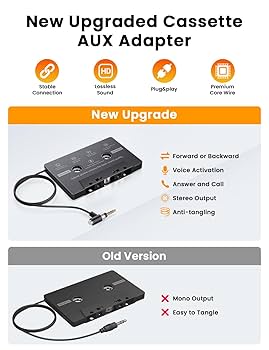
- Cassette Adapters:Insert into the cassette player and connect to your phone or MP3 player via a cable.
- FM Transmitters:Broadcast audio over FM radio frequencies to the car stereo.
- Line-In Adapters:Use RCA or other audio inputs on the stereo, if available.
Select an adapter based on your car stereo’s available inputs and your device’s output.
Wireless Vs Wired Solutions
Wireless adapters offer freedom from cables. They usually connect via Bluetooth and transmit audio to an FM transmitter or a receiver.
Wired adapters provide direct connection. They often deliver better sound quality and are more reliable.
| Feature | Wireless | Wired |
|---|---|---|
| Sound Quality | Good but may have interference | Clear and stable |
| Ease of Use | Easy, no cables | Requires cable connection |
| Price | Usually higher | Usually lower |
| Compatibility | Works with many devices | Depends on cable type |
Choose wireless for convenience or wired for best sound. Match the adapter to your car stereo and personal preference.
Gather Necessary Tools And Materials
Before you start converting your old car stereo to support an aux input, gathering the right tools and materials is key. Having everything at hand will save you from unnecessary trips and keep your project smooth. Let’s look at what you need to make this upgrade happen.
Basic Tools Needed
- Screwdrivers:Both flathead and Phillips screwdrivers are essential for removing the stereo and accessing wiring.
- Wire Strippers:These help you strip insulation cleanly without damaging the wires, making connections easier.
- Electrical Tape:Use it to secure your wire joints and prevent short circuits.
- Multimeter:This tool lets you check voltages and continuity, ensuring you connect the right wires safely.
- Panel Removal Tool:A plastic pry tool prevents damage when removing dashboard panels.
When I first attempted this, not having a panel removal tool almost caused permanent scratches on my dashboard. Investing in the right tools pays off quickly.
Additional Components
- Auxiliary Input Adapter:This is crucial—it converts the stereo’s wiring to accept an aux signal.
- 3.5mm Aux Cable:A simple cable that connects your phone or MP3 player to the adapter.
- RCA Connectors or Wire Harness:Depending on your stereo model, you might need these for proper connections.
- Soldering Kit (optional):For a more secure and permanent connection, soldering wires is a good idea, but not always necessary.
Do you know your stereo’s model number? It can make a big difference when choosing the right adapter and cables. Double-checking saves you from buying incompatible parts.

Credit: www.amazon.com
Prepare Your Car Stereo
Preparing your car stereo is the first step to add an aux input. This process involves carefully opening your stereo system and understanding its wiring. Taking your time here ensures a smooth installation and avoids damage.
Gather necessary tools like screwdrivers and panel removers. Work in a clean area to keep small parts safe. Remember to disconnect the car battery to prevent any electrical problems.
Remove Stereo Unit
Start by removing the stereo unit from the dashboard. Use a screwdriver to take out screws holding the unit in place. Gently pull the stereo forward, careful not to damage surrounding panels.
Some car models require special keys or clips to unlock the stereo. Check your car manual or search online for specific instructions. Keep all screws and clips in a safe place for reassembly.
Locate Wiring Harness
With the stereo out, find the wiring harness connected to the back. This bundle of wires supplies power and audio signals to the stereo. Identify the wires that carry audio input and ground connections.
Use a wiring diagram for your car model if available. This will help you spot the correct wires for the aux input. Mark these wires with tape or a marker for easy access during installation.
Install Aux Input Adapter
Installing an Aux input adapter in your old car stereo can breathe new life into your music experience. It lets you play songs directly from your phone or MP3 player without replacing the entire stereo system. The key is to connect the adapter properly so it works seamlessly with your car’s wiring.
Connect To Wiring Harness
Start by locating your car stereo’s wiring harness, which is the bundle of wires connected to the back of the stereo unit. You’ll need to connect the Aux adapter’s cables to the correct wires in this harness.
Use a wiring diagram for your car model to identify the right wires, usually the audio input wires or power sources. Matching colors is common, but always double-check the diagram. Using wire taps or crimp connectors can make the connection secure without cutting wires permanently.
Have you ever had a loose connection cause static or interruptions in sound? Ensuring firm and correct wiring here avoids those issues, giving you clear audio every time.
Secure The Adapter
Once connected, find a safe spot behind the stereo or inside the dashboard to place the adapter. It should be out of sight but easy to access if needed.
Use zip ties or double-sided tape to keep the adapter steady. Loose adapters can rattle or disconnect when you drive, ruining your music experience.
Think about your car’s interior space—securing the adapter properly also prevents it from getting damaged by movement or heat. A little extra care here saves you headaches later.
Test The Aux Connection
Testing the aux connection ensures your old car stereo plays sound from your device. This step confirms that the wiring and adapter work correctly. It helps find any problems before you drive.
Play Audio From Device
First, connect your phone or music player to the aux input. Use a good quality aux cable for best results. Turn on your car stereo and select the aux mode. Play a song or audio file on your device. Listen carefully to check if the sound comes through the car speakers. Adjust the volume on both the device and stereo for clear audio. Silence or poor sound means the connection needs checking.
Troubleshoot Common Issues
Check the aux cable for damage or loose ends. Try another aux cable to rule out a faulty wire. Make sure the device’s volume is not muted or too low. Confirm the car stereo is set to the correct aux input. Clean the aux port with a dry cloth to remove dust. Restart your device and stereo if the sound cuts out. Test with a different device to identify if the problem is with the player.
Alternative Methods To Add Aux Input
Older car stereos often lack modern features like aux inputs. Adding an aux input might seem tricky. Several simple alternatives let you play music from your phone or device. These options do not require complex installation or new stereo systems.
Fm Transmitter Option
An FM transmitter plugs into your phone or device. It sends audio signals to your car radio through an unused FM frequency. Tune your car stereo to that frequency to hear the sound. This method works with any car stereo that has an FM radio.
FM transmitters are easy to carry and use. They often include a built-in microphone for hands-free calls. The sound quality depends on the signal strength and nearby radio interference. Choose a less crowded FM channel for better clarity.
Cassette Adapter Solution
A cassette adapter fits into your car’s cassette player. The other end connects to your device’s headphone jack or USB port. It plays audio through the car stereo as if it were a cassette tape. This solution works well for cars with cassette players still in use.
The cassette adapter is simple to use and requires no power source. It provides better sound quality than FM transmitters in most cases. Make sure the cassette player is clean and working well for the best experience.

Credit: aluratek.com
Frequently Asked Questions
How Can I Add An Aux Input To My Old Car Stereo?
To add an aux input, purchase an FM transmitter or a cassette adapter. These devices connect your phone to the car stereo via the FM frequency or cassette slot. For a permanent solution, consult a professional to install an aux cable directly into the stereo’s circuit board.
Is It Difficult To Install An Aux Port In A Car?
Installing an aux port can be moderately challenging, depending on your car stereo model. Basic DIY skills are often sufficient. You’ll need to open the stereo and solder the aux cable to the circuit board. For those uncomfortable with electronics, professional installation is recommended.
What Tools Are Needed For Aux Installation?
Basic tools like a screwdriver, soldering iron, and pliers are necessary for aux installation. You may also need wire cutters and a multimeter. These tools help you open the stereo, solder the aux cable, and test the connection. Ensure you have the right tools before starting.
Can I Use Bluetooth Instead Of An Aux Cord?
Yes, Bluetooth adapters are an alternative to aux cords. They allow wireless streaming by connecting to your car’s stereo via FM frequency or directly. Bluetooth provides a cable-free experience, but may have slightly reduced audio quality compared to a direct aux connection.
Conclusion
Adding an aux input to an old car stereo can be simple. You just need the right tools and a little patience. This upgrade lets you play music from phones or other devices easily. Enjoy better sound without buying a new stereo.
Small changes like this make your drive more fun. Try the steps carefully and enjoy your favorite songs on the road. A few easy fixes can bring new life to old car audio.

