How to Tune a Kenwood Car Stereo: Expert Tips for Perfect Sound
Want to get the best sound from your Kenwood car stereo? Tuning it the right way can make a huge difference in how your music feels and sounds while you drive.
Whether you’re struggling with unclear audio or just want to boost your listening experience, this guide will help you fine-tune your stereo step by step. By the end, you’ll know exactly how to adjust your Kenwood system for crisp, powerful sound every time you hit the road.
Keep reading to unlock the full potential of your car stereo!
Preparing Your Kenwood Stereo
Preparing your Kenwood car stereo is essential for clear and balanced sound. Start with a clean setup to avoid interference and errors during tuning. Understand your stereo’s features and settings to make the process smooth and efficient.
Gathering Necessary Tools
Collect tools to help with tuning and adjustments. You will need:
- A small flathead screwdriver for opening compartments
- A user manual or model guide for reference
- A USB drive or auxiliary cable for media testing
- A smartphone or device with music files
- A pen and notepad to jot down settings
Having these ready keeps the process organized and easy.
Resetting To Factory Settings
Resetting clears old settings and errors. This provides a fresh start for tuning. To reset:
- Turn off the stereo
- Press and hold the reset button or combination key
- Wait for the display to clear or show reset confirmation
Check your manual for exact reset instructions. This step avoids conflicts with previous customizations.
Understanding Your Model Features
Kenwood stereos vary in functions and controls. Know your model’s unique features before tuning. Common features include:
| Feature | Purpose |
|---|---|
| Graphic Equalizer | Adjusts different sound frequencies |
| Subwoofer Control | Manages bass levels |
| Balance and Fader | Controls sound direction inside the car |
| Sound Effects | Enhances audio experience |
Read the manual section for these features. It helps to use them correctly during tuning.
Adjusting Basic Sound Settings
Adjusting the basic sound settings on your Kenwood car stereo is key to enjoying music exactly the way you like it. These settings let you control how different frequencies and speakers work together, shaping the overall sound experience. Taking a few moments to fine-tune these options can turn a standard drive into a personal concert.
Setting The Equalizer
The equalizer lets you boost or reduce specific frequencies to match your music style. You can choose from preset modes like Rock, Jazz, or Pop, or create a custom setting that fits your taste perfectly.
Try increasing the midrange frequencies if vocals sound muffled, or boost highs for crisper instruments. Have you noticed how a slight change in the equalizer can make a song feel completely different?
Balancing Bass And Treble
Bass and treble controls help you adjust the low and high sounds separately. If your bass feels too overwhelming, dial it back to avoid distortion, especially at higher volumes.
On the other hand, raising the treble can add clarity, but too much can create a harsh sound. Think about the kind of music you listen to most—is it bass-heavy or more vocal-focused? Adjust these settings to bring out the best in your favorite tracks.
Optimizing Fader And Balance
The fader controls the sound distribution between front and rear speakers, while the balance adjusts left and right speaker levels. Setting these correctly ensures every seat in the car gets a great audio experience.
If you often drive alone, you might want to shift the balance slightly towards your seat. When traveling with passengers, a centered setting works best to share the sound evenly. Have you tried experimenting with these controls to find your perfect sound stage?
Fine-tuning Advanced Audio Options
Fine-tuning advanced audio options lets you control sound details. It improves clarity, depth, and balance. This step enhances your Kenwood car stereo beyond basic settings. Adjusting these options creates a richer listening experience. Here is how to refine your audio setup.
Using Time Alignment
Time alignment adjusts speaker timing to match your ears. It fixes sound delays caused by speaker placement. Set delays so all sounds reach your ears together. This creates a natural and balanced soundstage. Use the Kenwood menu to select each speaker. Adjust milliseconds until the sound feels centered and clear.
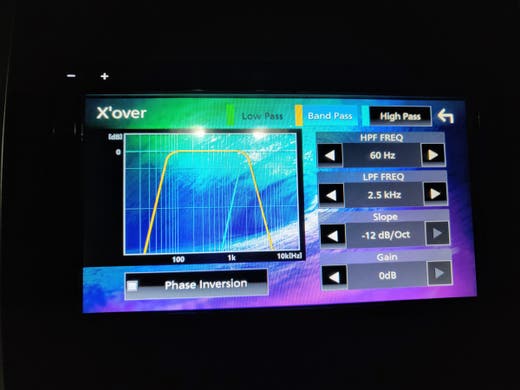
Adjusting Crossover Frequencies
Crossover frequencies direct sound to the right speakers. High frequencies go to tweeters, low to woofers or subwoofers. Set the crossover point to avoid overlap or gaps. This protects speakers and improves sound quality. Choose a frequency where each speaker performs best. Adjust settings in the Kenwood audio menu carefully.
Customizing Sound Effects
Sound effects add character to your music. Options include bass boost, treble boost, and equalizer presets. Try different effects to match music styles and your taste. Use the equalizer to adjust specific frequency bands. Save your favorite settings for easy recall. Keep adjustments subtle to avoid distortion or fatigue.
Credit: kenwood.eu
Optimizing For Different Music Genres
Optimizing your Kenwood car stereo for different music genres can dramatically improve your listening experience. Each genre has unique sound characteristics, and adjusting your settings accordingly helps highlight the best elements of your favorite tracks. Have you noticed how a flat setting sometimes makes rock feel dull or jazz sound lifeless? Tailoring your stereo to the music style brings out clarity and depth you didn’t realize was missing.
Settings For Rock And Pop
Rock and pop music thrive on energy and punch. Boosting the mid and high frequencies can add brightness and clarity to vocals and guitars. You want the drums to hit hard, so slightly increasing the bass helps create that driving beat without overwhelming the other instruments.
- Bass:Moderate boost to emphasize drums and rhythm guitar
- Midrange:Slightly elevated for clear vocals and guitar riffs
- Treble:Raised to add sparkle and presence
Try these settings, then adjust based on your favorite tracks. Does the guitar feel too sharp or the vocals muffled? Fine-tune until the sound feels lively but balanced.
Tuning For Classical And Jazz
Classical and jazz music demand a more natural and warm sound. These genres rely on subtlety and dynamic range, so avoid heavy bass boosts that can muddy the sound. Focus on clarity and smoothness to preserve acoustic instruments’ richness.
- Bass:Keep it flat or slightly reduced to prevent overpowering delicate sounds
- Midrange:Enhance slightly to bring out strings, brass, and woodwinds
- Treble:Keep moderate to maintain crispness without harshness
Think about how a saxophone or violin should sound in your car. If it feels too sharp or recessed, tweak the mids and highs gently until the music breathes naturally.
Adjustments For Hip-hop And Electronic
Hip-hop and electronic tracks often rely on deep bass and strong beats. You want your Kenwood stereo to deliver powerful lows without distortion. Maximize bass response, but be careful not to lose clarity in vocals and synths.
- Bass:Boost significantly for deep, punchy beats
- Midrange:Slightly lower to prevent vocal muddiness
- Treble:Adjust moderately to keep electronic sounds crisp
Have you ever felt the bass overwhelm the rest of the track? Dialing back mids and carefully raising treble can help maintain a clean, immersive sound. Experiment with these settings while playing your favorite hip-hop or electronic song to find the perfect balance.
Troubleshooting Common Issues
Troubleshooting common issues with your Kenwood car stereo can help improve sound quality and overall experience. Simple problems often cause big frustrations. Identifying the cause quickly saves time and effort. Below are solutions for frequent sound and connection problems.
Fixing Distortion Problems
Distortion affects audio clarity and enjoyment. Check speaker connections first. Loose wires often cause distortion. Make sure all wires are secure and undamaged.
Adjust the equalizer settings. Reduce bass or treble levels to lower distortion. Overloading the amplifier may also cause sound issues. Lower the volume to see if distortion fades.
Inspect speakers for damage. Torn cones or blown speakers produce poor sound. Replace damaged speakers for better results.
Resolving Sound Imbalance
Sound imbalance means some speakers sound louder than others. Use the balance and fader controls on your stereo. Set balance to center for even left-right sound. Adjust the fader to balance front and rear speakers.
Check speaker wiring for shorts or loose connections. Faulty wiring can cause uneven sound output. Test each speaker individually to identify problems.
Make sure amplifier settings match your speaker setup. Incorrect settings create uneven volume distribution. Adjust settings to match speaker size and location.
Handling Connectivity Issues
Connectivity problems disrupt music playback and controls. Start by checking all cable connections between the stereo and external devices. Re-seat or replace cables if needed.
Bluetooth pairing issues are common. Turn off Bluetooth on both devices and then turn it back on. Delete old pairings and reconnect fresh.
Software updates fix bugs that cause connectivity problems. Visit Kenwood’s website for the latest firmware. Follow instructions to update your stereo safely.

Credit: www.kenwood.eu
Maintaining Your Kenwood Stereo
Keeping your Kenwood car stereo in top shape goes beyond just tuning it correctly. Regular maintenance ensures your sound system performs well and lasts longer. Small efforts like updating software or cleaning can make a huge difference in your listening experience.
Regular Firmware Updates
Kenwood often releases firmware updates to fix bugs and improve performance. Checking for updates every few months keeps your stereo running smoothly. You can usually find updates on the Kenwood website or through their app.
Updating firmware might sound technical, but it’s usually straightforward. Just connect your stereo to a computer or USB and follow the instructions. Have you ever noticed improved features or sound quality after an update?
Cleaning And Care Tips
Dust and grime can dull your stereo’s display and buttons, making it harder to use. Clean your Kenwood stereo gently with a soft, dry cloth. Avoid harsh chemicals or sprays that can damage the screen or buttons.
Keep the area around your stereo clean too. Crumbs and spills can sneak into the device and cause problems later. Have you ever wiped down your stereo only to find it looks brand new afterward?
Protecting Against Damage
Your car stereo faces risks from heat, moisture, and accidental knocks. Park in shaded areas when possible to avoid overheating your stereo. Using a dashboard cover can help protect it from sun damage.
Also, avoid pressing buttons too hard or trying to remove the stereo without proper tools. Physical damage is often the most costly to fix. How careful are you with the controls on your Kenwood stereo?

Credit: www.kenwood-electronics.co.uk
Frequently Asked Questions
How Do I Tune A Kenwood Car Stereo Manually?
To tune manually, press the “Tune” or “Seek” button. Use the dial to adjust frequencies until you find a clear station. Save stations by holding the preset buttons for a few seconds. This method ensures precise control over your Kenwood stereo settings.
Can I Auto-tune My Kenwood Car Stereo?
Yes, Kenwood stereos have an auto-tune feature. Press and hold the “Seek” or “Scan” button. The stereo will automatically search and save available radio stations. This feature is fast and convenient for finding all local stations.
How To Improve Kenwood Stereo Sound Quality?
Adjust bass, treble, and balance settings via the menu. Customize equalizer presets to suit your music preferences. Proper tuning enhances audio clarity and richness. Using quality speakers and cables also boosts sound performance.
Why Won’t My Kenwood Stereo Tune To Certain Stations?
Interference or weak signals can prevent tuning. Ensure your antenna is connected and undamaged. Try relocating your vehicle for better reception. If problems persist, reset the stereo or update its firmware.
Conclusion
Tuning a Kenwood car stereo doesn’t need to be hard. Follow the steps, and you’ll enjoy clear, crisp sound. Start by adjusting the bass, treble, and balance. Make small tweaks for the best results. Each car and stereo might need different settings.
So, be patient and try different adjustments. With practice, your car rides will become more enjoyable. Listen to your favorite songs with better sound quality. Remember, well-tuned stereos enhance your driving experience. Happy tuning!