How to Unmute Pioneer Car Stereo: Quick & Easy Fixes Revealed
Have you ever found yourself frustrated, trying to enjoy your favorite tunes, only to realize your Pioneer car stereo is stuck on mute? It’s a common problem that can catch anyone off guard, especially when all you want is some good music during your drive.
But don’t worry—you’re just a few simple steps away from bringing your sound back to life. In this guide, you’ll discover easy ways to unmute your Pioneer car stereo quickly, so you can get back to enjoying every beat without any hassle.
Keep reading, and let’s fix this together.
Common Causes Of Muted Stereo
Muted sound on your Pioneer car stereo can be frustrating, especially when you’re eager to enjoy your favorite tunes on the road. Understanding the common causes of a muted stereo helps you troubleshoot quickly and get back to your music without hassle. Let’s look at some usual reasons why your stereo might be silent and how you can identify them.
Check The Mute Button
The mute button is the simplest cause of silence. Sometimes, it gets pressed accidentally, especially if you’re adjusting other controls while driving.
Look closely at your stereo’s display for a mute icon or indicator. Press the mute button again to see if the sound returns. If your remote control has a mute button, test that as well—small remote buttons often cause confusion.
Inspect Volume Settings
Low or zero volume is an easy mistake to overlook. Your stereo might be on but set to the lowest volume level.
Turn the volume knob slowly upward and listen carefully. Also, check if the volume is controlled via a connected device like a phone or USB player—sometimes, the volume there can be muted or too low.
Examine Audio Source
Your stereo might be muted because the audio source isn’t playing sound. For example, a paused CD, a smartphone with muted music, or a radio station with no signal can cause silence.
Switch between different audio sources like FM radio, Bluetooth, or AUX input to see if sound returns. This helps pinpoint whether the issue lies with the stereo or the source device.
Look For Wiring Issues
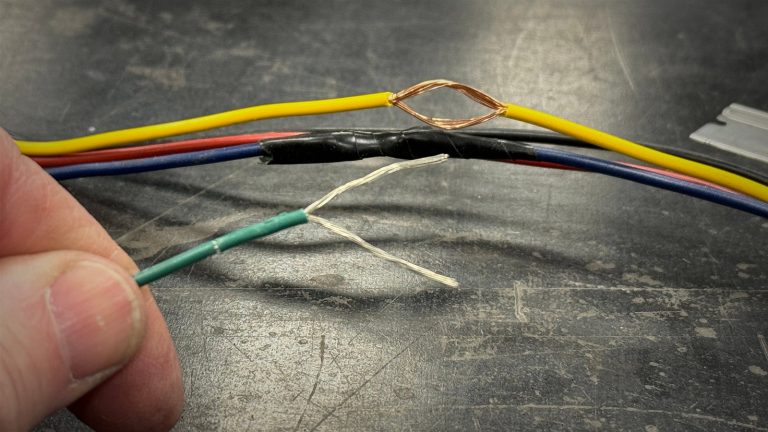
Loose or damaged wires can cut off sound completely. Check behind the stereo unit or under the dashboard for any disconnected or frayed cables.
If you recently installed or moved your stereo, wiring might have come loose. Securing all connections properly can restore sound instantly. If unsure, a quick visit to a professional might save time and prevent further damage.
Credit: www.diymobileaudio.com
Quick Fixes To Unmute Pioneer Stereo
Facing silence from your Pioneer car stereo can be frustrating. Quick fixes often restore sound without complex troubleshooting. These simple steps help unmute your stereo fast and get your music playing again.
Press The Mute Button Again
The mute function toggles sound on and off. Press the mute button once more to unmute. Sometimes a quick press restores audio instantly. Check the display for a mute icon; it should disappear.
Adjust Volume Levels
Volume might be set to the lowest level. Increase volume using the volume knob or buttons. Avoid sudden jumps; raise volume slowly to hear sound clearly. This simple action often resolves silent audio issues.
Reset The Stereo System
Resetting clears temporary glitches affecting sound. Locate the reset button, usually small and recessed. Use a pointed object to press and hold it for a few seconds. The stereo restarts, often fixing mute problems.
Disconnect And Reconnect Power
Power cycling resets the stereo’s internal system. Turn off the car and remove the stereo’s power source. Wait about 30 seconds before reconnecting power. This process refreshes the system and may restore sound output.
Advanced Troubleshooting Steps
Advanced troubleshooting can solve many Pioneer car stereo mute issues. These steps go beyond basic checks. They help find hidden problems that stop sound from playing. Follow each step carefully to restore audio.
Inspect Fuse And Wiring
Check the fuse linked to your car stereo. A blown fuse can block power, causing no sound. Look for loose or damaged wires behind the stereo unit. Tighten any loose connections. Replace wires that show wear or breaks. This ensures stable power and signal flow.
Update Firmware
Old firmware can cause glitches in your stereo’s functions. Visit the Pioneer website to download the latest update. Use a USB drive or SD card to install it on your stereo. Firmware updates fix bugs and improve performance. This might solve the mute problem.
Test With Different Audio Sources
Try playing sound from various sources like radio, USB, or Bluetooth. Different sources help identify if the issue is with one input. If sound works on some sources, check settings for the silent ones. If all sources are mute, the problem is likely inside the stereo.
Consult The User Manual
The user manual offers specific advice for your stereo model. It includes troubleshooting tips and error codes. Follow the manual’s instructions for mute and audio issues. Manuals often provide reset options that can fix sound problems quickly.

Credit: www.youtube.com
Preventing Future Muting Issues
Experiencing your Pioneer car stereo suddenly muting can be frustrating, especially if it happens repeatedly. Preventing future muting issues not only saves you from constant troubleshooting but also keeps your driving experience smooth and enjoyable. Focusing on key habits and care routines can help you avoid unexpected silences and maintain clear sound every time you hit the road.
Regular System Maintenance
Keeping your car stereo system clean and well-maintained can prevent many muting problems. Dust buildup or loose connections inside the unit often cause the system to mute unexpectedly. Take time every few months to check and clean the stereo’s buttons, knobs, and wiring.
Updating your stereo’s firmware also plays a crucial role. Many Pioneer models receive updates that fix bugs leading to random muting. Ask yourself—when was the last time you checked for software updates? It could be the simple fix your system needs.
Avoiding Interference
Interference from other electronic devices inside your vehicle can disrupt your stereo’s normal function. Keep your phone, GPS, and other gadgets at a reasonable distance from the stereo to reduce this risk. You might notice better sound stability by simply rearranging your dashboard setup.
Strong radio signals or faulty antennas can also cause muting. Make sure your antenna is secure and in good condition. Have you ever tested how your stereo performs in different locations? Sometimes, moving to an area with less signal noise makes a huge difference.
Proper Use Of Controls
Understanding how your stereo’s controls work can prevent accidental muting. For example, some Pioneer models mute audio when you press certain buttons or when the volume is turned down to zero. Familiarize yourself with these features to avoid unexpected silences.
Using the remote control carefully is equally important. Avoid pressing multiple buttons at once or holding down mute unintentionally. Have you noticed how a quick glance at your stereo before driving can help you spot any active mute settings? Developing this habit keeps you in control of your sound.

Credit: www.youtube.com
Frequently Asked Questions
How Do I Unmute My Pioneer Car Stereo Quickly?
Press the “Mute” or “Vol” button on the stereo or remote control. This toggles the mute function off and restores sound immediately.
Why Is My Pioneer Car Stereo Muted Automatically?
Automatic muting can happen due to Bluetooth calls, navigation prompts, or safety features. Check settings or disable auto-mute if unwanted.
Can I Unmute Pioneer Stereo Using My Smartphone App?
Yes, if your Pioneer stereo supports a smartphone app, you can unmute audio through the app’s control interface remotely.
What To Do If Unmute Button Doesn’t Work?
Try resetting the stereo by turning off and on. Check wiring or consult the manual if the problem persists.
Conclusion
Unmuting your Pioneer car stereo is straightforward. Follow the steps provided. Ensure your settings are correct. Adjust the volume carefully. Enjoy your favorite tunes without hassle. Always check connections if issues persist. Regularly update your stereo firmware. This ensures optimal performance.
Familiarize yourself with your stereo’s manual. It’s a valuable resource. Now, you can enjoy a seamless listening experience. Troubleshooting becomes easier with practice. Share these tips with friends. They might find them helpful too. Happy driving and listening!