
Do Cd R Work in Car Stereos: Truths You Need to Know
Are you wondering if those old CD-R discs will play in your car stereo? You’re not alone.
Many people have stacks of burned CDs and want to enjoy their favorite music while driving. But will your car’s CD player actually read those discs? Understanding how CD-Rs work with car stereos can save you from frustration and help you get the best sound on the road.
Keep reading to find out what really happens when you pop a CD-R into your car stereo and how to make sure your music plays smoothly every time.
Credit: www.newegg.com
How Car Stereos Read Cds
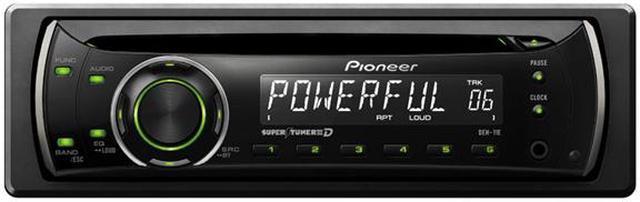
Car stereos read CDs using a precise process that involves light and data decoding. The CD player inside the stereo spins the disc at a steady speed. A small laser beam shines on the disc surface to read the stored information. This information then converts into sound that plays through your car’s speakers.
The ability to read a CD depends on the disc format and the laser technology inside the player. Understanding these factors helps explain why some CDs work well while others do not.
Cd Formats Compatible With Car Stereos
Most car stereos support these common CD formats:
- Audio CDs (CD-DA) – Standard music discs
- CD-R – Recordable discs burned once
- CD-RW – Rewritable discs with multiple burns
Audio CDs have data in a format specifically for sound. CD-R and CD-RW can hold audio files but must be correctly formatted. Some car stereos only read finalized discs, so unfinalized CDs might not play.
Laser Technology In Cd Players
The laser in a car stereo reads tiny pits and lands on the disc surface. These pits represent digital data bits. The laser reflects differently off pits and lands, creating signals the player decodes.
Most car stereos use a red laser with a wavelength around 780 nm. This laser works well with standard CDs and CD-Rs. Some advanced players use lasers that can also read CD-RWs, which have different reflectivity.
The laser’s accuracy and the disc’s quality affect playback. Scratched or dirty discs can cause reading errors or skips.

Credit: www.amazon.com
Differences Between Cd-r And Commercial Cds
Understanding the differences between CD-R and commercial CDs is key to knowing if your car stereo will play them without a hitch. These two types of discs might look alike, but they are made differently and behave in unique ways. Let’s break down what sets them apart and why that matters for your music experience on the road.
Manufacturing Process
Commercial CDs are produced through a stamping process. This means a master disc is created, and copies are pressed from it, making each disc identical and highly durable.
CD-Rs, however, are blank discs you can record on once. They use a dye layer that changes when a laser writes data onto them. This process is slower and less precise compared to commercial CDs.
This difference in creation affects how your car stereo reads the disc. Have you noticed some CD-Rs skip or fail to play? That’s often because the laser in your stereo struggles with the dye layer’s reflection.
Data Storage And Longevity
Commercial CDs store data in tiny pits and lands that reflect laser light consistently. This makes them very reliable and long-lasting, often working well after many years.
CD-Rs rely on the dye’s chemical changes to store data, which can degrade over time. Exposure to sunlight or heat can cause data loss or playback issues sooner than commercial CDs.
If you want your music to last in your car, think about how you store and handle your discs. Are you protecting your CD-Rs from harsh conditions? That small step can make a big difference in how long they keep working smoothly.
Common Issues With Cd-rs In Car Stereos
CD-Rs often face problems in car stereos. These issues can stop your music from playing smoothly. Understanding common problems helps in avoiding frustration and wasted time.
Car stereos sometimes struggle with CD-Rs due to their design. Not all players read CD-Rs well. The disc’s quality and the stereo’s lens condition affect playback.
Playback Failures
Playback failures happen when the car stereo cannot read the CD-R. The player may skip the disc or show an error message. This happens because CD-Rs reflect laser light differently than regular CDs.
Low-quality CD-Rs or discs burned too fast increase playback failures. Dirt or scratches on the CD surface can also cause this issue. Some car stereos are simply incompatible with certain CD-R brands.
Skipping And Read Errors
Skipping occurs when the stereo’s laser loses track of the music data. This causes abrupt pauses or jumps in songs. Read errors happen when the player cannot decode the data correctly.
Skipping and read errors often result from physical damage on the CD-R. Fingerprints, dust, or deep scratches interrupt the laser’s path. Burning a CD-R at a slower speed can reduce these errors.
Factors Affecting Cd-r Playback
CD-R playback in car stereos can be unpredictable, and several factors play a role in whether your disc will work smoothly or skip and fail. Understanding these factors helps you make better choices when burning and using CDs in your vehicle. Let’s look at the key elements that affect CD-R performance in car audio systems.
Disc Quality And Brand
The quality of the CD-R itself makes a big difference. Cheap or no-name brands often use lower-quality materials that wear out faster and cause read errors in car players.
Brands like Verbatim or Sony are known for producing reliable discs. Choosing a trusted brand can reduce the chances of playback issues significantly.
Have you ever noticed how some discs look shinier or more durable? That’s usually a sign of better manufacturing, which your car stereo will appreciate.
Burning Speed And Software
How you burn the CD-R matters just as much as the disc quality. Burning at very high speeds can cause errors that your car stereo might not handle well.
Slowing down the burning speed to a moderate level, like 4x or 8x, often results in a more stable disc. The software you use should also be reliable and updated to avoid corrupt data.
Think about the last time you burned a disc too quickly and it didn’t work later—isn’t it worth taking a bit more time for a better result?
Car Stereo Age And Compatibility
Older car stereos might struggle to read CD-Rs because their laser lenses were designed primarily for factory-pressed CDs. The reflective surface on CD-Rs differs slightly, causing potential reading issues.
Newer models tend to support a wider range of disc types and formats. Checking your stereo’s manual or manufacturer site for compatibility information can save you frustration.
Does your car stereo feel outdated? Upgrading or cleaning the lens might be the solution to better CD-R playback.
Tips For Using Cd-rs In Car Stereos
Using CD-Rs in car stereos can be simple with the right approach. Choosing good discs, burning them correctly, and caring for both discs and stereo improve playback. These tips help avoid skipping, errors, and unreadable discs. Follow these guidelines to enjoy music smoothly on the road.
Choosing The Right Cd-r
Select CD-Rs made for audio recording. Look for discs with a low error rate. Brands with good reviews often work better in cars. Avoid cheap or no-name discs. Use discs with a speed rating that matches your burner. Slower speed ratings often ensure better compatibility. Prefer CD-Rs labeled “for audio” or “high quality.”
Proper Burning Techniques
Burn CDs at a lower speed for better results. Avoid the highest speed your burner offers. Use reliable burning software with a finalizing option. Finalizing stops the disc from being rewritten and makes it readable. Burn discs in “Disc-At-Once” mode if available. Check the burned disc for errors before playing. Use good quality audio files to avoid sound issues.
Maintaining Discs And Stereo
Keep CDs clean and scratch-free. Wipe discs from the center outward using a soft cloth. Store discs in cases when not in use. Avoid exposing discs to heat or sunlight. Clean the car stereo lens regularly with a lens cleaner. Avoid ejecting discs while the stereo is on. Handle discs by the edges to prevent fingerprints.
Credit: www.allpar.com
Alternatives To Cd-rs For Car Audio
If you’re wondering about alternatives to CD-Rs for your car audio, there are plenty of options that offer convenience and better sound quality. CD-Rs can be hit or miss depending on your car stereo’s compatibility. Luckily, technology has moved forward, giving you smarter ways to enjoy music on the road.
Usb Drives And Aux Inputs
USB drives are a simple way to carry thousands of songs without worrying about discs. Most modern car stereos come with USB ports that let you plug in a flash drive directly. This lets you skip tracks easily and even supports playlists if your stereo allows it.
Auxiliary inputs are another straightforward option. If your car has an aux port, you can connect your phone or MP3 player using a 3.5mm cable. This method doesn’t rely on Bluetooth, so the sound quality stays crisp without interference.
- USB drives hold large music collections in one place.
- Aux inputs work with almost any audio device with a headphone jack.
- Both options provide plug-and-play convenience.
Bluetooth And Streaming Options
Bluetooth has become a favorite for many drivers because it eliminates wires altogether. Pair your phone with the car stereo, and you can stream your favorite playlists, podcasts, or audiobooks directly. It’s a great way to keep your music fresh without swapping discs or drives.
Streaming services like Spotify, Apple Music, or Amazon Music offer endless content. Have you ever found a new artist during a long drive just by browsing a playlist? This flexibility beats the limitations of CD-Rs, which require manual burning and updating.
- Bluetooth provides wireless freedom for your music.
- Streaming apps keep your playlist updated automatically.
- Many car stereos support voice control for safer use on the road.
Frequently Asked Questions
Can All Car Stereos Play Cd-rs?
Not all car stereos can play CD-Rs. Older models might not support them. It’s essential to check your stereo’s specifications. Most modern stereos, however, do support CD-Rs. Ensure the CD-R is properly burned and finalized. This helps to ensure compatibility with your car stereo system.
Why Won’t My Cd-r Play In My Car?
Your CD-R might not play if it’s improperly burned. Ensure the CD-R is finalized. Some car stereos require specific formats. Check if your stereo supports the format used. Also, dirty or scratched discs can cause issues. Clean your CD-R before trying again.
Do Cd-rs Offer Good Sound Quality In Cars?
CD-Rs can offer excellent sound quality in cars. The quality depends on the original recording. Ensure you use high-quality audio files when burning CDs. Proper burning software can also enhance quality. Always maintain your car stereo and discs for optimal sound performance.
Is There A Difference Between Cd And Cd-r?
Yes, there’s a difference between CD and CD-R. A CD is pre-recorded and can’t be altered. CD-Rs are blank discs that can be recorded once. They require proper burning software. CD-Rs are popular for creating custom playlists. Both can be played in compatible stereos.
Conclusion
CD-R discs can work in many car stereos, but not all. Some players read them well, while others may skip or not play at all. Quality and brand of the CD-R affect performance. Burning speed and disc format also matter.
Always test your CD-R in the car stereo before long trips. Using standard audio CD format helps avoid playback issues. Keep discs clean and scratch-free for better results. Simple checks save frustration. So, yes, CD-Rs often work, but results can vary.
Choose wisely and enjoy your music on the road.